

Building a practical Microsoft Foundry and Azure AI platform foundation with Bicep, Azure DevOps, tokenised parameter files, validation, What-If, Key Vault, Log Analytics, and a runtime path for future RAG and application workflows.
Series: Azure AI-103 platform POC with Bicep, Azure DevOps, Microsoft Foundry, and runtime application patterns
Naming note: Microsoft’s AI platform naming has changed. Azure AI Studio evolved into Azure AI Foundry and is now Microsoft Foundry. In this article, I use Microsoft Foundry for the broader platform, Foundry resource for the deployable top-level Azure resource, Foundry model deployment for model runtime access, and Foundry Tools for the former Azure AI Services / Cognitive Services style capabilities. The underlying Azure Resource Manager provider still appears as Microsoft.CognitiveServices/accounts, so Bicep templates, validation messages, regional availability errors, and Azure deployment logs may still show that provider name.
I have recently started spending more time on Microsoft Foundry, Azure AI, AI-103, AI-300, and the broader topic of agentic AI. One thing became clear very quickly: learning AI only through portal demos and playgrounds does not really work for me.
As someone with an Azure infrastructure and DevOps background, I wanted to understand what it would look like to deploy a Microsoft Foundry-based AI platform foundation properly. Not just create a Foundry resource manually, but build the surrounding platform pattern: resource groups, naming, Bicep modules, parameter files, validation, What-If, environment promotion, observability, secrets handling, regional considerations, and a realistic path toward an application runtime.
So I decided to build a small Microsoft Foundry and Azure AI platform POC that feels closer to a real workload foundation than a quick lab exercise. The goal was not to design a perfect production architecture from day one. The goal was to build something realistic enough to learn from: a reusable Azure DevOps pipeline, a modular Bicep structure, tokenised parameter files, a multi-environment deployment flow for dev, sit, and uat, and a base set of Azure services that could later support an application runtime, RAG workflow, or lightweight agentic assistant.
This blog post walks through Azure POC, the structure I used, the pipeline design decisions, and a few useful lessons I hit along the way - including Azure AI regional availability issues, why globally unique service names and custom subdomains can break idempotent reruns if the resource group naming changes, and why observability and secrets management should be included early even in a learning POC.
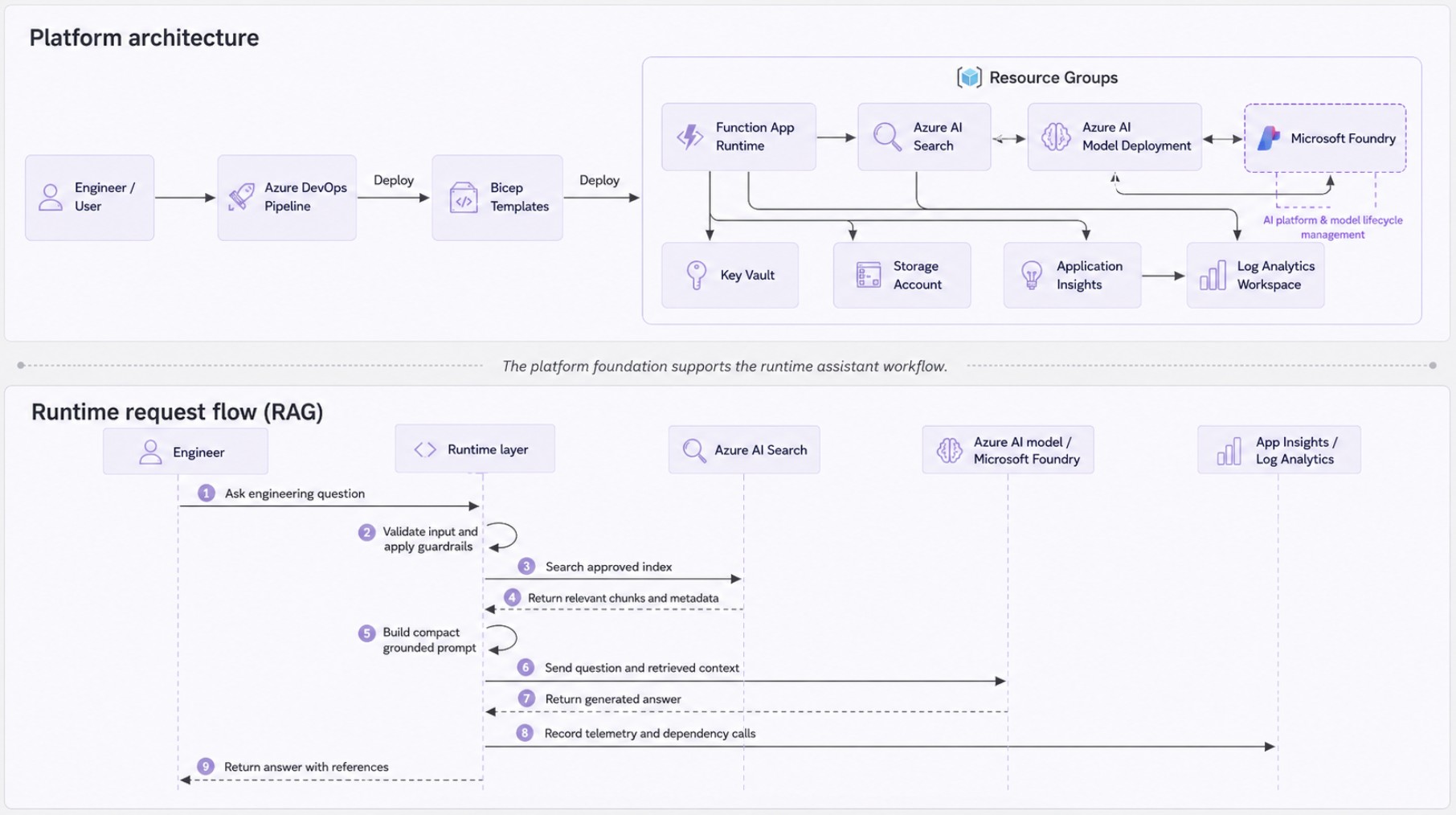
Before going into the pipeline and Bicep structure, the diagram below shows the broader shape of the POC. The top half shows the platform foundation deployed by Azure DevOps and Bicep. The bottom half shows the runtime request flow that this foundation is intended to support later: an engineer asks a question, the runtime retrieves approved context from Azure AI Search, sends a grounded prompt to a Foundry model deployment, records telemetry, and returns an answer with source references.
The current article focuses mostly on the platform foundation. The runtime and RAG workflow are not fully implemented yet, but they are important because they explain why these infrastructure components exist in the first place.

Why I Built This POC
I wanted to learn Azure AI in a way that made sense for an Azure engineer. Reading documentation and watching videos is useful, but I know from experience that real learning happens when you build something, break it, fix it, and then improve the design.
My goal was not to create a fully production-ready AI platform immediately. The goal was to create a small but realistic deployment pattern that could answer questions like:
- How do I structure Microsoft Foundry and Azure AI infrastructure using Bicep?
- How do I deploy the same workload into multiple environments?
- How do I separate preview and deploy stages?
- How do I validate Bicep before deploying?
- How do I use What-If as a safety mechanism?
- How do I handle Azure resource group bootstrapping?
- How do I include Key Vault and Log Analytics without turning the POC into a large enterprise platform build?
- What happens when a service is not available in the secondary region?
- How do I keep the design simple enough for AI-103 learning, but structured enough to grow later?
- How do I make sure the deployed platform has a clear path toward a real runtime, application, or RAG workflow?
This is also the type of practical experience that helps when preparing for Microsoft AI exams. Certifications are useful, but the concepts become much clearer when you have a real pipeline, real Bicep modules, real Azure deployment errors, and real platform trade-offs to work through.
The Business Wrapper I Wanted Around the POC
One thing I wanted to avoid was building a random collection of Foundry resources with no purpose. A technical POC still needs a business wrapper, even if the first version is mainly for learning.
The business scenario I used for this POC is simple:
Build a controlled internal Azure engineering assistant that could eventually answer questions from approved architecture, DevOps, platform, and AI study documentation using Microsoft Foundry, Azure AI Search, and a small application/runtime layer.
That does not mean the current version already implements the full assistant. It means the infrastructure is being shaped around a plausible use case rather than around a random lab. In a real organisation, this could become an internal assistant for:
- finding approved platform standards and deployment patterns;
- answering common Azure engineering questions from internal documentation;
- supporting onboarding for cloud engineers;
- retrieving environment-specific runbook or support information;
- testing RAG patterns against a bounded and non-sensitive data set.
This framing is important because it keeps the POC grounded. The question is not only, "Can I deploy Foundry resources?" The better question is, "Can I create a repeatable and secure enough foundation for a useful AI workload?"
Azure POC Scope and Boundaries
I treated this as a production-like learning POC, not a production platform. That distinction matters.
In scope for this stage:
- repeatable infrastructure deployment with Bicep;
- multi-environment Azure DevOps pipeline structure;
- regional deployment pattern across Australia East and Australia Southeast;
- a Microsoft Foundry resource and Azure AI Search as core AI building blocks;
- Function App as the future runtime/orchestration placeholder;
- Storage Account as the Function App dependency and future document/data landing area;
- Key Vault as the central place for secrets and configuration values that should not live in source control;
- Log Analytics and Application Insights as the base observability layer;
- validation, What-If, and early failure behaviour in the pipeline;
- clear future path toward RAG, managed identity, RBAC, runtime code, and Foundry integration.
Out of scope for this stage:
- production data;
- customer data or personal information;
- fully private networking;
- APIM or Azure Front Door implementation;
- automated failover;
- complete RAG ingestion and vector index automation;
- full agent runtime implementation;
- production support model, alerting catalogue, and operational runbooks.
This scope gave me enough realism to learn properly, without pretending the POC is already an enterprise-grade production deployment.
The Main Platform Idea
The POC deploys a small Azure AI-oriented workload foundation using Azure DevOps and Bicep. The current stack includes:
- Azure Resource Group
- Microsoft Foundry resource
- Azure AI Search
- Azure Key Vault
- Log Analytics Workspace
- Application Insights
- Storage Account
- App Service Plan
- Azure Function App
The Function App is not yet the full agent runtime. At this stage, it is a placeholder runtime component that can later be used for API logic, retrieval-augmented generation, orchestration, or agentic workflow integration.
Its role in the current POC is to provide a realistic compute layer around the Foundry resource. In a real application, something needs to receive requests, call a Foundry model deployment, query Azure AI Search, apply business logic, write telemetry, and return a response. The Function App gives me a simple place to add that logic later without changing the overall infrastructure structure.
Key Vault and Log Analytics are included because they are not optional thinking in a serious platform pattern. Even for a POC, I want to know where secrets will go, how the runtime will get configuration, and where platform/resource/application telemetry will land.
This keeps the design closer to an application platform rather than a collection of disconnected Azure resources.
From Infrastructure to Runtime
Although this article focuses mainly on infrastructure deployment, I did not want the POC to stop at a collection of Azure resources. The platform only becomes useful when an application or runtime can use it.
In this design, the Function App is the future runtime layer. It can receive an engineering question, validate the request, query Azure AI Search for approved context, build a grounded prompt, call the Foundry model deployment, record telemetry through Application Insights, and return an answer with source references.
That runtime behaviour is not the main implementation focus of this article, but it influenced the infrastructure decisions. Azure AI Search is included because the assistant needs controlled retrieval. Key Vault is included because the runtime needs safe configuration and secret handling. Application Insights and Log Analytics are included because the workflow needs troubleshooting visibility. Storage is included because future document ingestion and runtime dependencies need a landing place.
This is why I think about the POC as a platform foundation rather than only an infrastructure deployment. The first milestone is repeatable infrastructure. The next milestone is a small working runtime: approved documents in, relevant retrieval, grounded answer out, telemetry captured, and evaluation repeatable.
Repository Structure for Azure AI POC
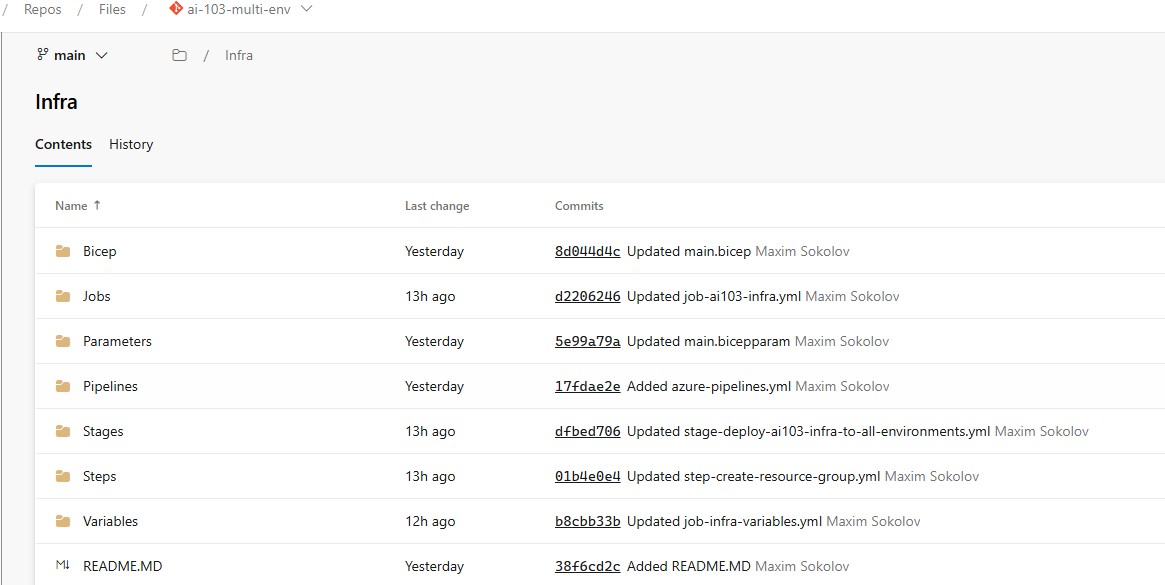
The repository is organised around reusable pipeline building blocks. Instead of putting everything into one large YAML file, the deployment is split into pipelines, stages, jobs, steps, variables, parameters, and Bicep modules.
Infra
├── Bicep
│   ├── main.bicep
│   ├── resource_group.bicep
│   └── Modules
│       ├── ai-search.bicep
│       ├── foundry-resource.bicep
│       ├── app-insights.bicep
│       ├── app-service-plan.bicep
│       ├── diagnostic-settings.bicep
│       ├── function-app.bicep
│       ├── key-vault.bicep
│       ├── log-analytics.bicep
│       └── storage-account.bicep
├── Jobs
│   └── job-ai103-infra.yml
├── Parameters
│   ├── main.bicepparam
│   └── resource_group.bicepparam
├── Pipelines
│   └── azure-pipelines.yml
├── Stages
│   └── stage-deploy-ai103-infra-to-all-environments.yml
├── Steps
│   ├── step-create-resource-group.yml
│   ├── step-deploy-bicep.yml
│   ├── step-replace-bicep-tokens.yml
│   ├── step-validate-bicep-deployment.yml
│   ├── step-validate-bicep-tokens.yml
│   └── step-whatif-bicep-deployment.yml
└── Variables
    ├── infra-ai103-dev.yml
    ├── infra-ai103-sit.yml
    ├── infra-ai103-uat.yml
    ├── infra-shared-common.yml
    └── job-infra-variables.yml
I originally used names such as ai-services.bicep, AiServicesName, and AiServicesLocation. For the updated Microsoft Foundry naming, I would now use foundry-resource.bicep, FoundryResourceName, and FoundryResourceLocation. This makes the repository clearer because the deployed account is a Foundry resource, even though the underlying ARM provider still appears as Microsoft.CognitiveServices/accounts.
This structure is probably more than you need for a simple lab, but that is the point. The POC is not just about deploying one Foundry resource. It is about learning how a reusable Azure infrastructure pipeline can be designed as the foundation for an application workload.
Environment and Region Strategy
The pipeline supports three environments: dev, sit, and uat. The current regional pattern uses auea for Australia East and ause for Australia Southeast.
The idea is that the same pipeline can loop through environments and regions. That gives me a good way to practise multi-environment infrastructure delivery without manually duplicating YAML blocks for each target.
For a real production rollout, I would not assume that every Azure service should be duplicated identically in every region. The POC deliberately exposes that problem. Some resources can be deployed regionally. Some have regional availability constraints. Some resources, such as logging and centralised secrets, may be deployed per region, per environment, or as shared platform services depending on the organisation's operating model.
For this POC, I kept the design simple and environment-contained. That makes it easier to destroy, rebuild, and reason about during learning.
Naming Convention
The naming convention I wanted to follow is:
envcode-zone-service-region-instance
For example:
dev-poc-foundry-auea-01
dev-poc-search-auea-01
dev-poc-kv-auea-01
dev-poc-log-auea-01
dev-poc-appi-auea-01
dev-poc-asp-auea-01
dev-poc-func-auea-01
For resource groups, I decided not to use the instance number. The resource group name is cleaner this way:
dev-poc-agenticai-auea-rg
dev-poc-agenticai-ause-rg
Storage accounts are the exception because Azure Storage account names must be globally unique, lowercase, between 3 and 24 characters, and cannot contain hyphens. Key Vault names also have global uniqueness constraints, so I treat both Storage Account and Key Vault naming carefully when designing repeatable reruns.
Pipeline Design
The pipeline uses a two-stage pattern for each environment: a preview stage and a deploy stage. The preview stage performs the safety checks before any real deployment happens, while the deploy stage performs the actual Bicep deployment after validation and What-If.
For each environment, the same job template is reused across the configured regions. In my case, the pipeline currently loops through dev, sit, and uat, and then through the regional codes auea and ause.
The end result in Azure DevOps looks similar to this:
Preview Infrastructure [dev]
  Preview Infrastructure [dev-auea]
  Preview Infrastructure [dev-ause]

Deploy Infrastructure [dev]
  Deploy Infrastructure [dev-auea]
  Deploy Infrastructure [dev-ause]
This makes the run easier to read. Instead of one large deployment job, each environment and region combination is visible in the pipeline run, which makes troubleshooting much simpler.
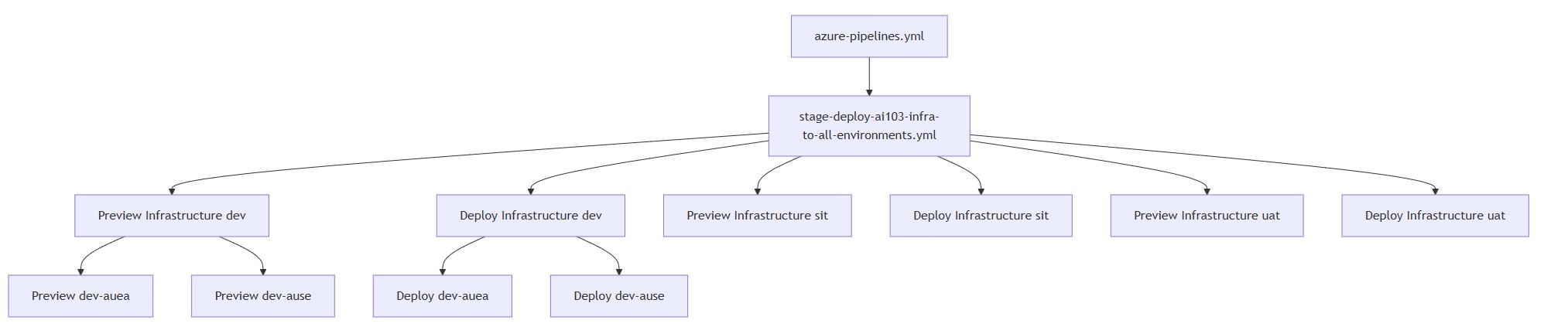
The diagram below shows how the YAML template structure expands into actual Azure DevOps stages and jobs. The root pipeline calls the stage template, the stage template creates preview and deploy stages for each environment, and each stage then creates region-specific jobs.
In this example, the pipeline creates separate preview and deploy jobs for dev, sit, and uat. For the dev environment, the diagram also shows how the jobs split into auea and ause regional deployments.
Pipeline Control Flow
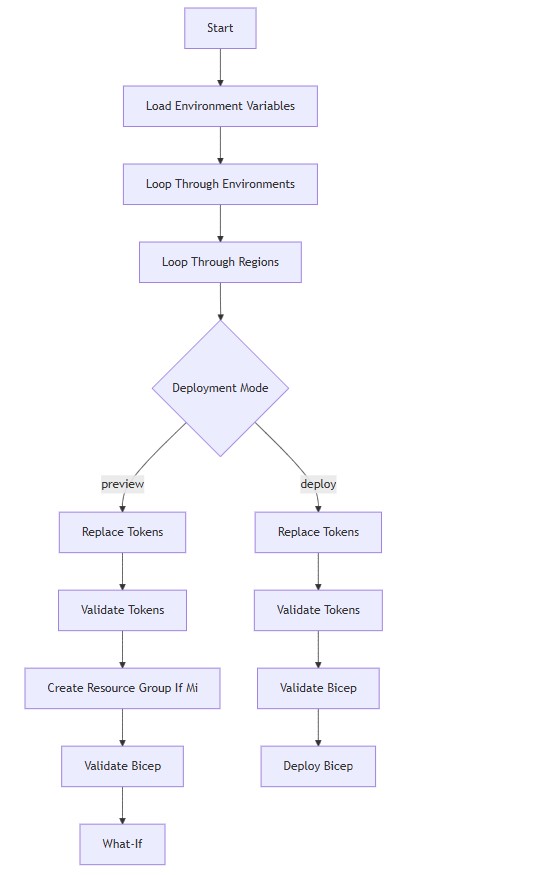
The diagram below shows the control flow behind the pipeline. Azure DevOps loads the shared and environment-specific variables, loops through each environment, then loops through the configured regions for that environment.
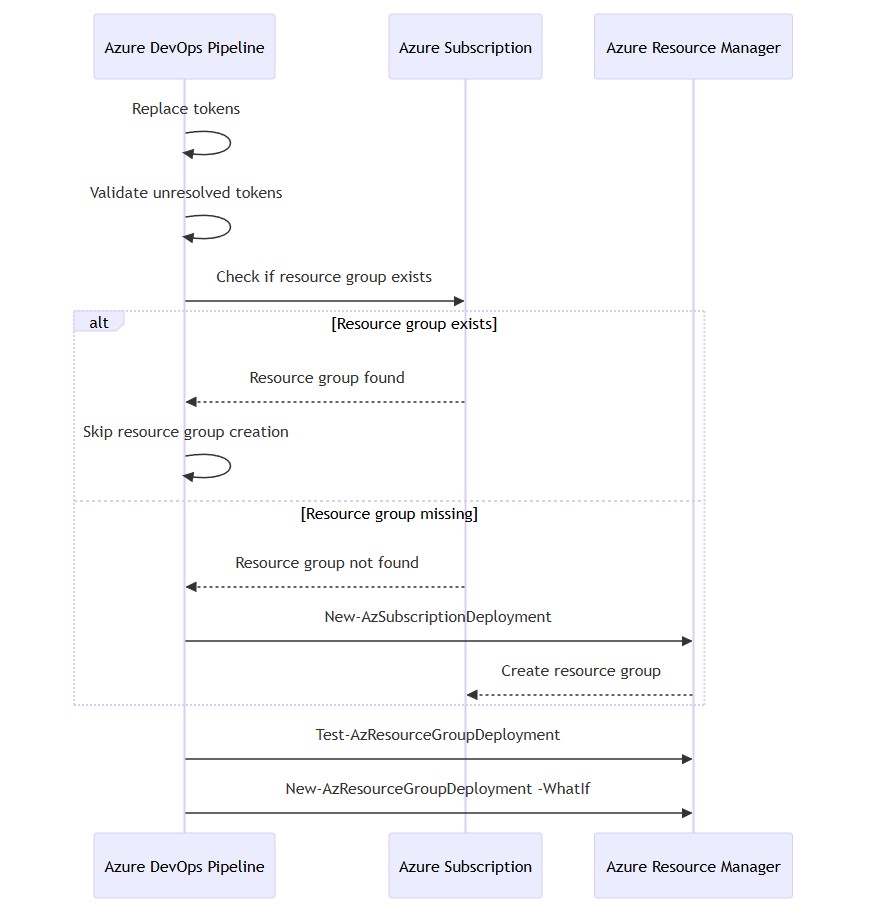
The same job template is used for both preview and deploy modes. The difference is controlled by the DeploymentMode parameter. In preview mode, the pipeline replaces tokens, validates the parameter files, creates the resource group if it is missing, validates the Bicep deployment, and runs What-If. In deploy mode, it skips the resource group bootstrap and performs the final deployment after validation and What-If.
Preview Stage Behaviour
The preview stage performs the following actions:
checkout repository
replace tokens
validate unresolved tokens
create resource group if missing
validate Bicep deployment
run What-If
The important point is that the resource group is created only in the preview stage, and only if it does not already exist. This is useful because resource group creation is a bootstrap activity. Once the resource group exists, the deploy stage should not need to recreate it.
Deploy Stage Behaviour
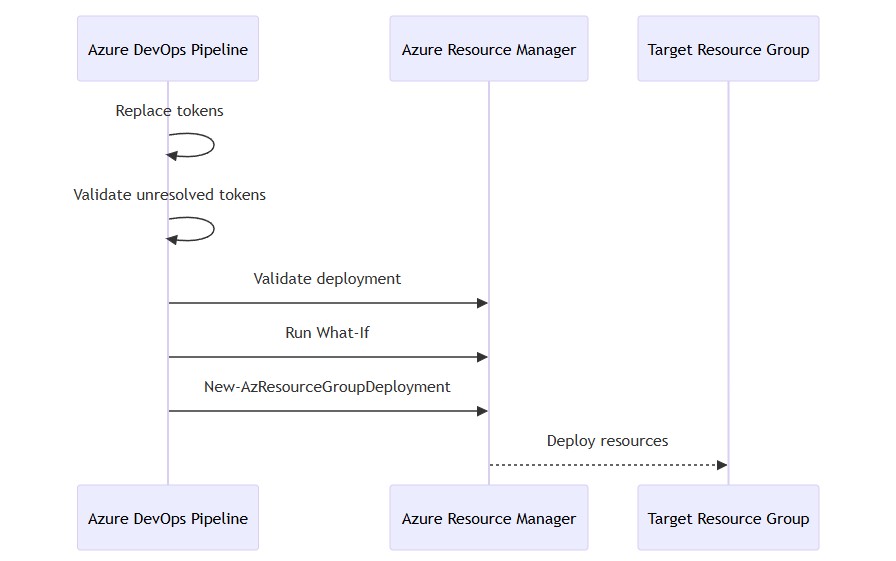
The deploy stage performs the real resource deployment:
checkout repository
replace tokens
validate unresolved tokens
validate Bicep deployment
deploy Bicep resources
The deploy stage does not create the resource group. That is intentional. It keeps the bootstrap logic separate from the main deployment logic.
Why I Use Tokenised Bicep Parameter Files
The parameter files use token placeholders instead of hardcoded values. This allows the same .bicepparam files to be reused across environments and regions, while the actual values are supplied by Azure DevOps variable templates.
For example, the Bicep parameter file contains placeholders like this:
param location = '#{DeployLocation}#'
param resourceGroupName = '#{ResourceGroupName}#'
param foundryResourceName = '#{FoundryResourceName}#'
param searchServiceName = '#{SearchServiceName}#'
param keyVaultName = '#{KeyVaultName}#'
param logAnalyticsWorkspaceName = '#{LogAnalyticsWorkspaceName}#'
param applicationInsightsName = '#{ApplicationInsightsName}#'
param functionAppName = '#{FunctionAppName}#'
The matching values are built in the pipeline variable template. For example, the job-level variables define the environment code, region code, deployment location, and resource names:
variables:
  EnvCode: ${{ parameters.EnvCode }}
  RegionCode: ${{ parameters.RegionCode }}
  DeployLocation: ${{ parameters.Location }}

  ZoneCode: poc
  InstanceNumber: '01'

  ResourceGroupName: $(EnvCode)-$(ZoneCode)-agenticai-$(RegionCode)-rg
  FoundryResourceName: $(EnvCode)-$(ZoneCode)-aisvc-$(RegionCode)-$(InstanceNumber)
  SearchServiceName: $(EnvCode)-$(ZoneCode)-search-$(RegionCode)-$(InstanceNumber)
  KeyVaultName: $(EnvCode)-$(ZoneCode)-kv-$(RegionCode)-$(InstanceNumber)
  LogAnalyticsWorkspaceName: $(EnvCode)-$(ZoneCode)-log-$(RegionCode)-$(InstanceNumber)
  ApplicationInsightsName: $(EnvCode)-$(ZoneCode)-appi-$(RegionCode)-$(InstanceNumber)
  FunctionAppName: $(EnvCode)-$(ZoneCode)-func-$(RegionCode)-$(InstanceNumber)
When the pipeline runs for dev in auea, those variables resolve to values similar to this:
DeployLocation: australiaeast
ResourceGroupName: dev-poc-agenticai-auea-rg
FoundryResourceName: dev-poc-foundry-auea-01
SearchServiceName: dev-poc-search-auea-01
KeyVaultName: dev-poc-kv-auea-01
LogAnalyticsWorkspaceName: dev-poc-log-auea-01
FunctionAppName: dev-poc-func-auea-01
That means the single Bicep parameter file stays generic, while the pipeline controls the environment-specific and region-specific values. The same main.bicepparam file can be used for dev-auea, dev-ause, sit-auea, uat-auea, and so on.
After token replacement, the pipeline runs a validation step to make sure no unresolved tokens remain. This is a small but important guardrail. If a value such as #{ResourceGroupName}# is still present after token replacement, the pipeline fails early before the deployment reaches Azure Resource Manager.
Bicep Scope Design
The POC uses two deployment scopes:
- Subscription scope for resource group creation
- Resource group scope for the actual workload resources
The resource group Bicep file uses subscription scope and is deployed using New-AzSubscriptionDeployment. The main workload Bicep file uses resource group scope and is deployed using New-AzResourceGroupDeployment.
Why Key Vault Is Included Early
In the first version of many Azure POCs, secrets and connection strings end up in local files, app settings, or pipeline variables. That may be acceptable for a throwaway experiment, but it is not a pattern I want to carry forward.
I added Key Vault as a platform component early because the Function App will eventually need configuration values such as Foundry endpoints, API settings, or temporary secrets during development. The preferred direction is still managed identity and RBAC wherever possible, but some configuration values still need a controlled home.
For this POC, Key Vault gives me a place to test:
- centralised secret storage;
- separation between application configuration and sensitive values;
- managed identity access from the Function App;
- Key Vault references in Function App application settings;
- future rotation and audit patterns;
- diagnostic logging for secret access events.
The important design decision is that Key Vault is not added as a dumping ground for everything. Non-sensitive configuration can remain as normal app settings. Sensitive values should go into Key Vault. Where a service supports Microsoft Entra ID and managed identity properly, I would rather remove the secret entirely than store it better.
Why Log Analytics and Application Insights Are Included Early
Azure AI POCs are easy to demo and hard to troubleshoot if telemetry is added as an afterthought. I wanted the observability foundation in place from the beginning.
For this Azure POC, Log Analytics acts as the central workspace for platform and resource logs, while Application Insights is linked to the Function App runtime. That gives me a path to capture:
- Function App requests, dependencies, exceptions, and traces;
- Azure resource diagnostics where enabled;
- Key Vault audit events;
- AI Search operational logs and metrics where supported;
- deployment and runtime troubleshooting signals;
- later RAG-specific signals such as retrieval latency, failed queries, grounding problems, and application errors.
I am deliberately not trying to collect every possible log category at this stage. That can become noisy and expensive. The better pattern is to collect the logs needed for troubleshooting, security visibility, and learning, then expand deliberately as the workload becomes more real.
Diagnostic Settings Pattern
Where supported, I use diagnostic settings to send resource logs and metrics to Log Analytics. For a production-like pattern, I prefer this to clicking around in the portal because diagnostics should be repeatable and visible in source control.
The pattern is simple:
resource diagnosticSetting 'Microsoft.Insights/diagnosticSettings@2021-05-01-preview' = {
  name: '${resourceName}-diag'
  scope: targetResource
  properties: {
    workspaceId: logAnalyticsWorkspaceId
    logs: [
      {
        categoryGroup: 'audit'
        enabled: true
      }
    ]
    metrics: [
      {
        category: 'AllMetrics'
        enabled: true
      }
    ]
  }
}
In practice, not every Azure resource exposes the same log categories, and not every service supports category groups in the same way. That is why I prefer to keep the diagnostic settings module flexible rather than hardcoding assumptions that only work for one resource type.
For a POC, I would rather start with audit and operational categories that matter, prove that logs land in the workspace, and then tune the collection. For production, I would also think about retention, table-level cost, alert rules, dashboards, and whether some logs should be archived to Storage or routed to a SIEM.
Why Validate Before What-If and Deploy?
The pipeline has a dedicated Bicep validation step before What-If and deployment. It runs:
Test-AzResourceGroupDeployment
The purpose of this step is to catch deployment issues before the pipeline reaches What-If or the real deployment stage. It helps identify problems such as invalid syntax, missing parameters, wrong parameter types, invalid resource names, unsupported locations, invalid SKU values, and Azure Resource Manager validation errors.
One of the useful examples from this POC was a validation run for the dev-ause job. The Bicep file compiled successfully, the parameter file was generated correctly, and the pipeline authenticated to the right Azure subscription. However, Azure returned a platform-level validation error:
Code    : LocationNotAvailableForResourceType
Message : The provided location 'australiasoutheast' is not available for resource type
          'Microsoft.CognitiveServices/accounts'.
This was useful because it showed that the issue was not the YAML structure, token replacement, or Bicep syntax. The pipeline was correctly trying to deploy the configured resources into australiasoutheast. The actual problem was that the Microsoft Foundry resource type was not available in that region.
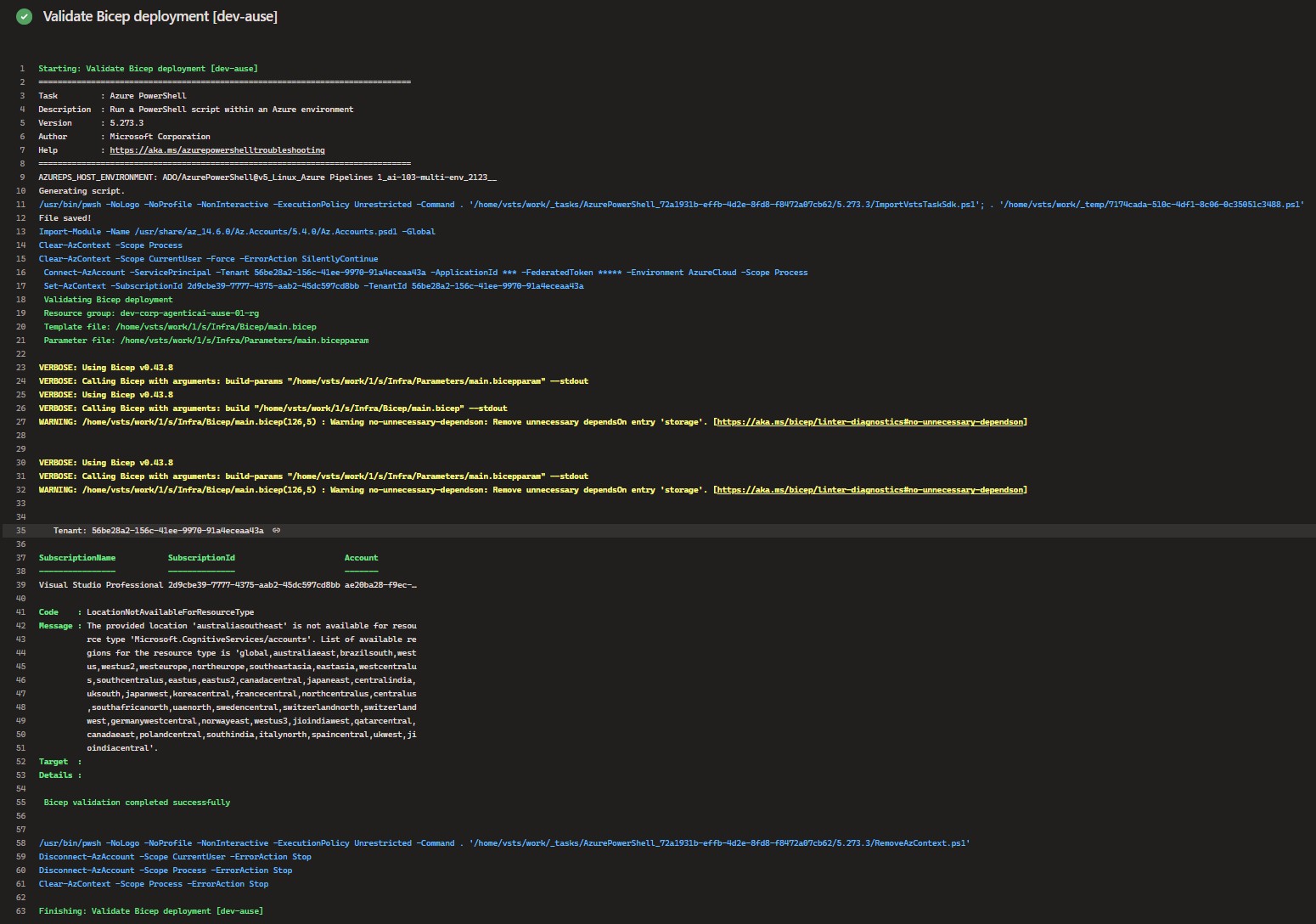
One important lesson here is that validation must be treated as a gate, not just as log output. In my first version, the validation result was printed in the pipeline logs, but the task still completed successfully. That meant the pipeline could continue to What-If or deployment even though Azure had already reported a validation issue.
As expected, the same issue appeared again later during the actual deployment step. This time the Deploy Bicep resources [dev-ause] task failed because Azure Resource Manager rejected the deployment for the same regional availability reason:
Code=LocationNotAvailableForResourceType
Message=The provided location 'australiasoutheast' is not available for resource type
'Microsoft.CognitiveServices/accounts'.
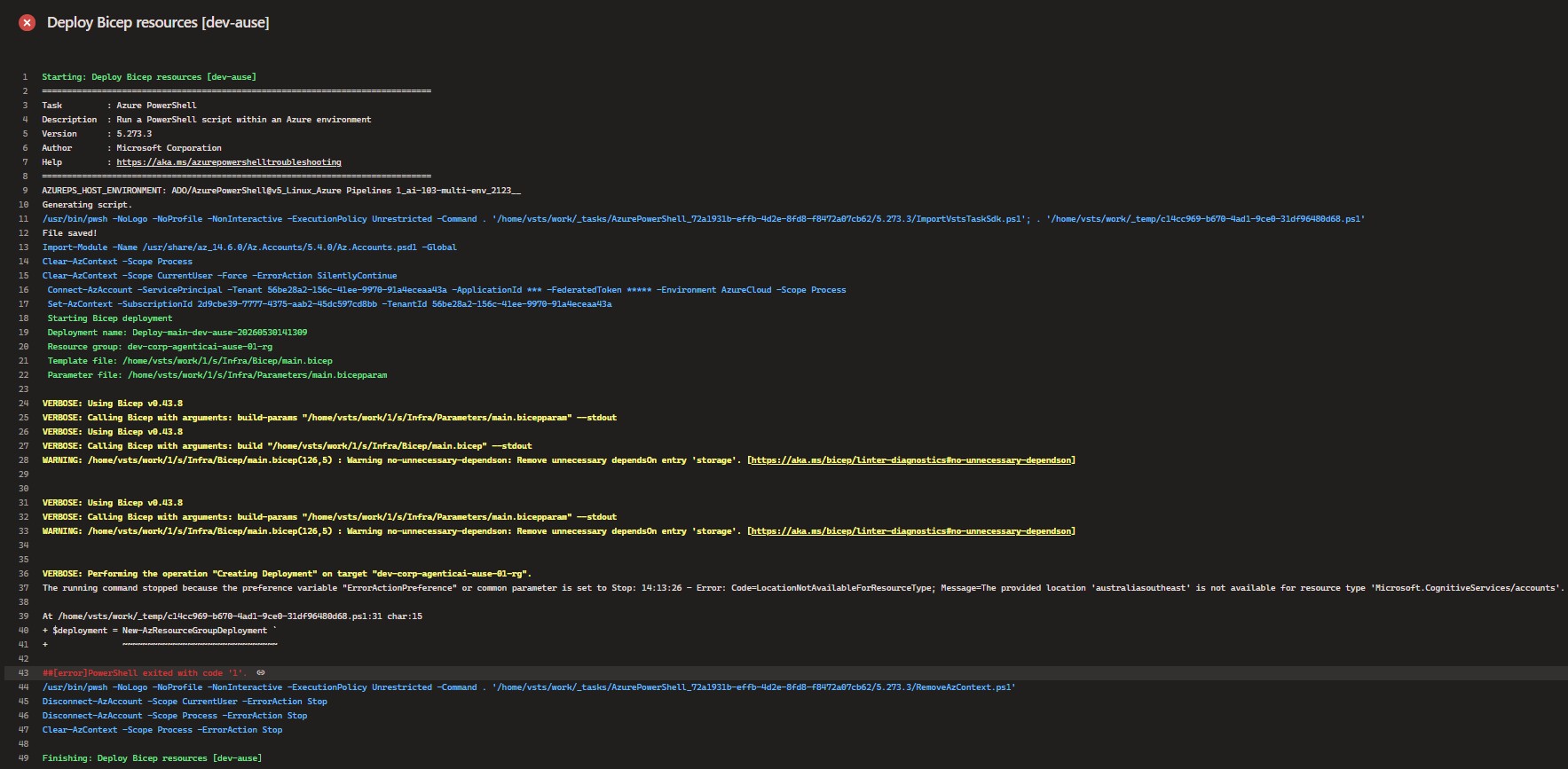
This made the issue much clearer. The validation step had already shown the problem, but because the script did not hard-fail, the pipeline was still able to continue. For a production-style pipeline, that is not the behaviour I want. If validation finds a real Azure Resource Manager error, the job should stop there and never reach What-If or the deployment step.
To make the validation step behave properly, the script should capture the output from Test-AzResourceGroupDeployment and throw an error if any validation errors are returned:
$validationResult = Test-AzResourceGroupDeployment `
  -ResourceGroupName "$(ResourceGroupName)" `
  -TemplateFile $TemplateFile `
  -TemplateParameterFile $ParamsFile `
  -Verbose

if ($null -ne $validationResult) {
  $validationJson = $validationResult | ConvertTo-Json -Depth 20
  throw "Bicep validation failed. Validation result: $validationJson"
}
With that change, the validation step becomes a hard gate. If Azure reports an issue such as LocationNotAvailableForResourceType, the pipeline fails during validation and never reaches the What-If or deployment steps for that job.
This is exactly why I like having a separate validation step. It gives the pipeline a clear checkpoint before any real deployment happens, and it makes Azure platform constraints visible early.
After validation, the pipeline runs What-If:
New-AzResourceGroupDeployment -WhatIf
Bicep What-If shows what Azure expects to create, modify, or remove. This is especially useful when learning, because it helps you understand the impact before making the actual change.
The First Real Lesson: Not Every Azure Service Exists in Every Region
One of the useful lessons from this Azure POC was that multi-region deployment does not mean blindly deploying every resource into every configured region.
In my pipeline, I had configured both Australia East and Australia Southeast:
auea = australiaeast
ause = australiasoutheast
That worked as a general regional deployment pattern, but the Foundry resource introduced a constraint. The application stack could be deployed regionally, but the Foundry resource could not simply be deployed into australiasoutheast in the same way.
The fix was to separate the general deployment location from the Microsoft Foundry location. In the job variables, I introduced a dedicated variable:
FoundryResourceLocation: australiaeast
Then, in the Bicep parameter file, I passed the Foundry location separately from the normal deployment location:
param location = '#{DeployLocation}#'
param foundryResourceLocation = '#{FoundryResourceLocation}#'
And in the main Bicep file, the Foundry resource module used the Foundry-specific location instead of the regional deployment location:
module foundryResource 'Modules/foundry-resource.bicep' = {
  name: '${resourcePrefix}-foundry-resource'
  params: {
    name: foundryResourceName
    location: foundryResourceLocation
    skuName: foundryResourceSku
    tags: commonTags
  }
}
This allowed the regional stack to continue deploying into auea and ause, while the Foundry resource was deployed into a supported region.
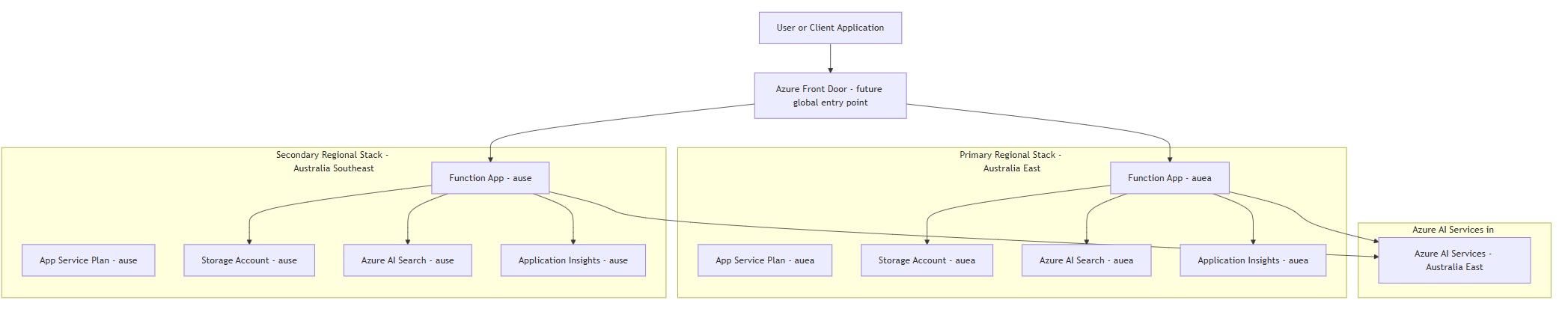
Disaster Recovery Service Placement Pattern
Architecturally, this became an important disaster recovery and platform design lesson. A secondary region does not always mean an identical copy of every resource. Some services are regional, some are global, some have limited regional availability, and some require a different failover or consumption pattern.
For this POC, the practical design became:
dev-auea stack:
  deploy regional resources into australiaeast
  deploy the Foundry resource into australiaeast

dev-ause stack:
  deploy regional resources into australiasoutheast
  deploy or reference the Foundry resource in australiaeast
To make this clearer, I created a more detailed disaster recovery service placement diagram. The point of the diagram is not to present a complete production DR architecture, but to show the principle I wanted to capture in the POC: regional runtime components can be deployed into both regions, while services with limited regional availability may need to be deployed in a supported region and consumed by both stacks.
In a more complete design, a global entry point such as Azure Front Door could sit in front of the regional Function Apps and route users to the appropriate healthy regional endpoint. I did not build that part in this POC yet, but it is useful to include in the diagram because it shows how the regional stacks could eventually be exposed and failed over.
In this pattern, the Function App, Storage Account, Azure AI Search, Application Insights, and App Service Plan can follow the regional application stack if that is the chosen operating model. I would not automatically duplicate every shared platform service per region. For this POC, Key Vault and Log Analytics are better treated as shared environment-level services unless there is a specific requirement for regional isolation, data residency, or independent failover. The Foundry resource is also treated separately because it cannot be assumed to exist in every target region. The secondary stack can still run in australiasoutheast, but it may need to call a Foundry endpoint hosted in australiaeast.
This distinction matters because regional deployment and regional duplication are not the same thing. Runtime components may need to exist in each region to support failover, but shared services such as Key Vault and Log Analytics should be placed deliberately. Duplicating them without a clear requirement adds cost, configuration drift, and operational overhead. For this learning POC, I prefer to keep those shared services simple and explicit, then revisit the design if the workload ever needs a stricter production DR model.
That is not a full production disaster recovery design yet, but it is a realistic learning point. The platform needs to understand which services can be deployed regionally, which services need special handling, and which application components need configuration that points to the correct regional or shared endpoint.
Successful Dev Pipeline Run
After updating the Bicep template to separate the general deployment location from the Microsoft Foundry location, I reran the pipeline for the dev environment. This time the Preview [dev] Infra and Deploy [dev] Infra stages completed successfully.
This was an important milestone because it confirmed that the pipeline flow was working end to end for the first environment. The preview stage completed the checks, and the deploy stage then deployed the infrastructure for both configured regions.
The screenshot below shows the successful pipeline run. The dev preview and deploy stages completed, while the later sit and uat stages were skipped because I only needed to validate the pattern in dev first.
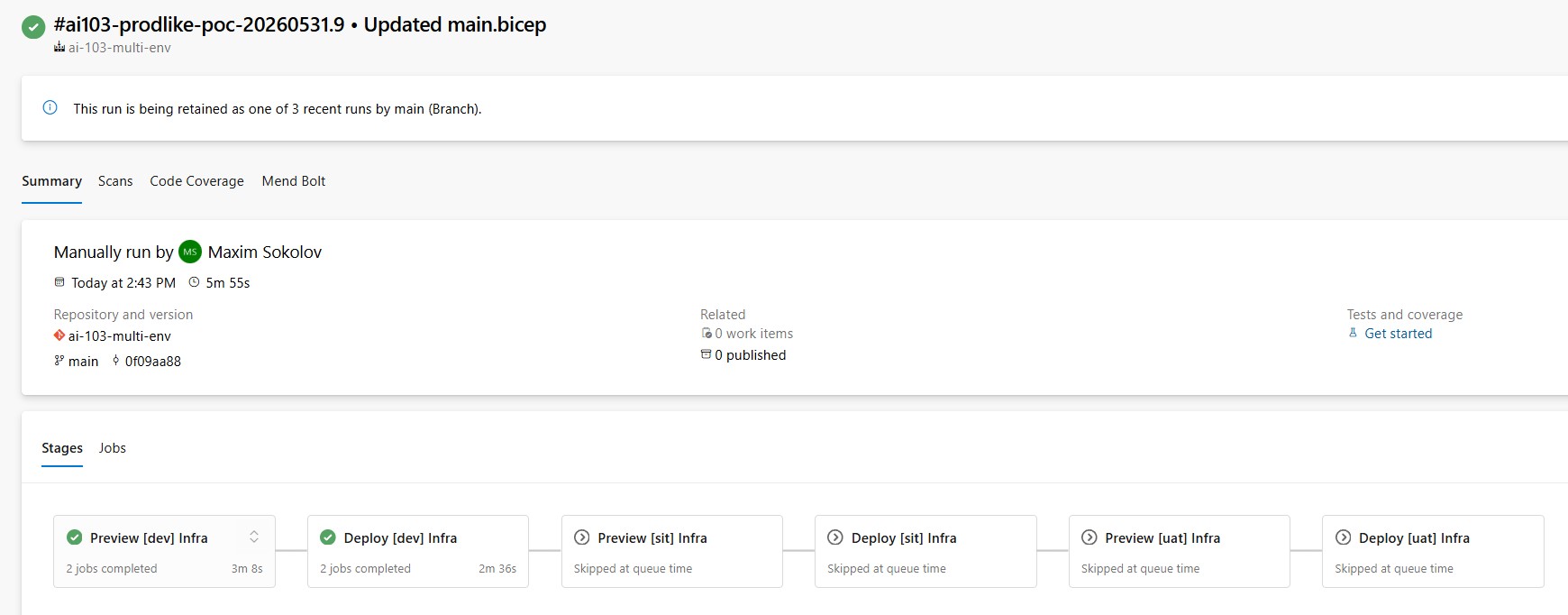
At this point, the POC moved from pipeline theory into a working deployment baseline. I had a reusable YAML structure, token replacement, validation, preview/deploy separation, regional deployment logic, Key Vault, and Log Analytics all working together for the dev environment.
Successful Dev Deployment Across Both Regions
After fixing the Microsoft Foundry regional availability issue, I reran the pipeline for the dev environment. This time the deployment completed successfully and created the expected resources across both configured regions.
This was an important checkpoint for the POC. It confirmed that the environment loop, regional loop, token replacement, resource group bootstrap, naming convention, and Bicep modules were all working together as expected.
The screenshot below shows the deployed dev resources after the successful run. At this point, the POC was no longer just validating templates or showing pipeline structure. It had created a working Microsoft Foundry and Azure AI platform baseline that I could continue to build on.
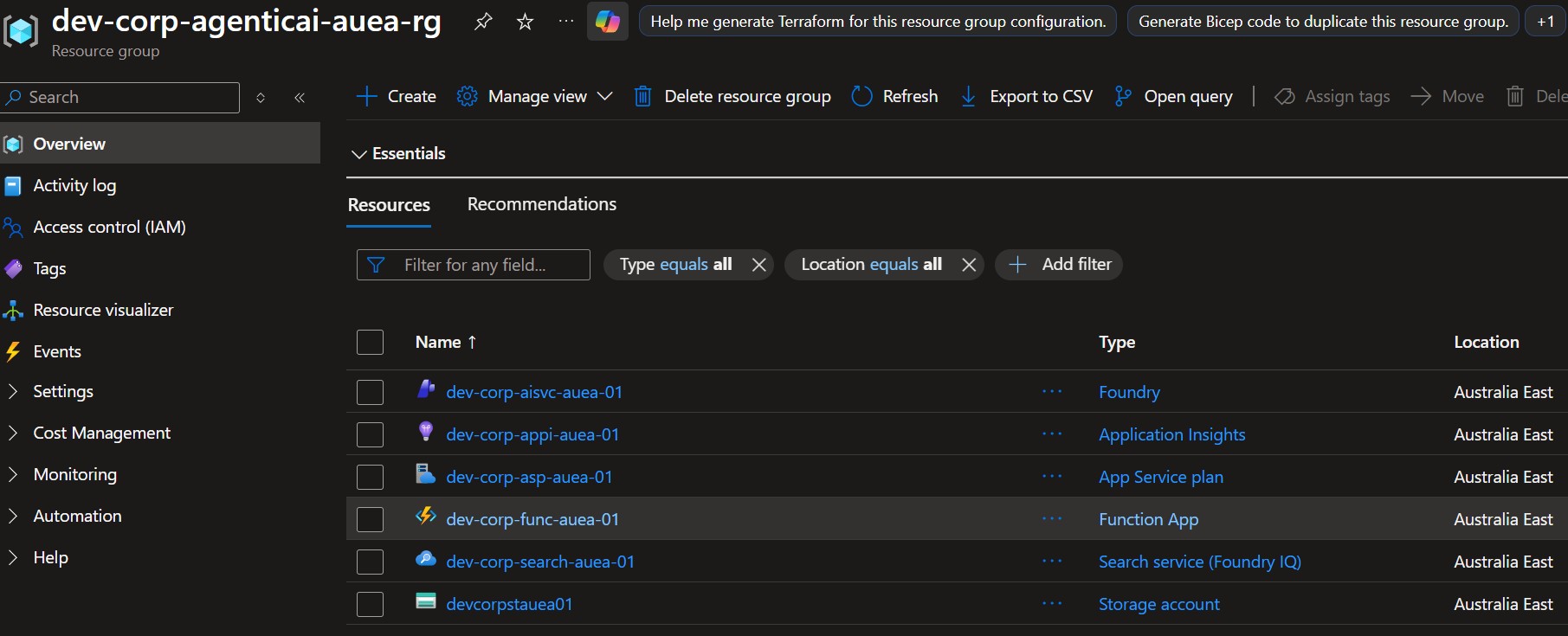
It is still only a learning environment, but this successful deployment gave me a practical foundation for the next stage of the POC: managed identity, RBAC, private networking, Microsoft Foundry project configuration, RAG indexing, runtime code deployment, and eventually some application or agent orchestration logic.
The Second Lesson: Global Names Can Break Idempotency If the Resource Group Changes
Another useful lesson came from rerunning the pipeline after changing the resource group naming convention.
Some Azure resource names and DNS names are globally unique. This includes Foundry resource custom subdomain names, Azure AI Search service names, Function App hostnames, Storage account names, and Key Vault names.
If those resources already exist in one resource group, and the pipeline starts targeting a different resource group while using the same global names, Azure treats it as a request to create new resources with names that are already taken.
That leads to errors like:
CustomDomainInUse
ServiceNameUnavailable
The lesson is simple: if you want idempotent reruns, keep the target resource group and resource names stable. If you intentionally change the resource group naming convention, you may also need to delete the old resources, purge soft-deleted resources where applicable, or introduce a unique suffix for globally unique resources.
This is one of those small platform details that only becomes obvious when you run the pipeline repeatedly. A portal demo rarely teaches it. A real deployment pipeline does.
How the Runtime Layer Fits In
The Function App is currently a runtime placeholder. It receives configuration values such as the Foundry endpoint, Azure AI Search service name, Key Vault references, Application Insights connection string, and Storage configuration.
In a later version of the POC, this Function App could become the place where orchestration logic lives. It could accept API requests, call a Foundry model deployment, query Azure AI Search, implement a simple RAG workflow, or act as a lightweight agentic orchestration layer.
The direction I want to move toward is:
- use managed identity from the Function App where possible;
- avoid API keys in code;
- keep non-sensitive app configuration in Function App settings;
- store sensitive values in Key Vault and reference them from app settings;
- send application telemetry to Application Insights;
- send platform diagnostics to Log Analytics;
- keep local development configuration separate from deployed cloud configuration.
That approach makes the app layer easier to evolve later without redesigning the infrastructure each time.
Security and Governance Guardrails
This POC is not handling production data, but I still wanted the guardrails to point in the right direction. AI workloads can make security teams nervous, especially when people start talking about chat, documents, embeddings, and agents. The best way to reduce that concern is to be clear about boundaries.
The current guardrails are:
- no production data in the POC;
- no customer data or personal information;
- no secrets committed to the repository;
- environment-specific values controlled through pipeline variables and parameter files;
- Key Vault used for secrets and sensitive configuration;
- managed identity preferred over keys where supported;
- basic observability through Application Insights and Log Analytics;
- internal-only testing assumption;
- no autonomous production actions;
- human review required before promoting the design beyond a learning POC.
This is not a full governance model, but it is a better starting point than building the AI workload first and trying to retrofit security later.
What This POC Does Not Do Yet
This is still a learning POC. It is not a complete production AI platform or runtime application.
- No private endpoints yet
- No managed identity based Function App storage connection yet
- No full RBAC module coverage yet
- No Microsoft Foundry project or model deployment automation yet
- No APIM or Azure Front Door implementation yet
- No automated failover
- No RAG index creation yet
- No Function App code deployment yet
- No runtime API implementation yet
- No automated evaluation question set yet
- No production alerting catalogue or operational runbook yet
I am deliberately keeping this list visible because it prevents the POC from being oversold. It is production-like in structure, but it is not production-ready yet.
Future Improvements
The next improvements I would make are:
- use managed identity for Function App access to Azure AI Search, Storage, and Key Vault where supported;
- add RBAC modules for Function App, Search, Storage, and Key Vault access;
- move from storage account key connection strings toward identity-based storage configuration for the Function App;
- add private endpoints for Storage, AI Search, Key Vault, and Foundry resource where supported and justified;
- expand diagnostic settings carefully, without collecting unnecessary logs;
- add Microsoft Foundry project and model deployment configuration;
- add AI Search index, schema, and data source provisioning;
- add a simple document ingestion process for Markdown or PDF source documents;
- add Function App code deployment;
- add a small runtime API for question answering;
- add smoke tests after deployment;
- add a small evaluation question set for RAG answer quality;
- add cost-control tags and Azure budgets;
- add approval gates before SIT and UAT deployments.
How I Would Decide Whether This POC Is Successful
A POC should not be judged only by whether the pipeline is green. For this POC, I would use the following success criteria:
- the infrastructure can be repeatedly deployed through Azure DevOps;
- validation fails early when Azure Resource Manager reports a real issue;
- What-If gives a useful preview before deployment;
- regional service placement is explicit rather than accidental;
- Key Vault and Log Analytics are deployed as part of the platform baseline;
- the Function App has a clean path to use managed identity and secure configuration;
- the design can support a basic RAG workflow later without major restructuring;
- the POC remains cheap enough and simple enough to run as a learning environment;
- the limitations are documented honestly.
That is a more useful definition of success than simply saying, "The resources deployed."
Why This Was Useful for AI-103 and AI-300 Learning
This exercise helped connect several areas that are often learned separately: Microsoft Foundry, Foundry resources, Azure AI Search, serverless runtime design, Bicep modules, Azure DevOps templates, multi-environment deployment, What-If and validation, regional availability thinking, Key Vault, Log Analytics, and Application Insights.
For exam preparation, this is useful because the concepts become practical. You are not just memorising that Azure AI Search exists. You are deploying it, naming it, validating it, handling regional constraints, and thinking about how an application would consume it.
For real-world engineering, this is even more useful. AI workloads still need proper platform foundations. They still need governance, repeatable deployment, secure configuration, monitoring, cost awareness, lifecycle management, and a clear runtime model.
Final Thoughts
The biggest lesson from this POC is that learning Microsoft Foundry and Azure AI properly is not just about models and prompts. For an Azure engineer, it is also about how the platform is built around those models.
A small AI demo can be created quickly in the portal. But a repeatable AI platform requires more thought. Where do resources live? How are they named? How are they deployed? How are changes validated? Where do secrets live? Where do logs go? How do environments progress? How do we handle unsupported regions? How do we keep the design simple enough to learn but structured enough to grow? And how does the deployed platform eventually support a real application workflow?
This POC is not the final answer. It is a starting point. But it gives me a practical foundation for learning Microsoft Foundry, Azure AI, AI-103, AI-300, and agentic AI platform patterns in a way that fits my Azure DevOps and infrastructure background.
That is exactly what I wanted from it: not a polished AI demo, but a working platform baseline that exposes the real engineering decisions around Microsoft Foundry and Azure AI infrastructure, runtime design, observability, and future RAG workflows.