

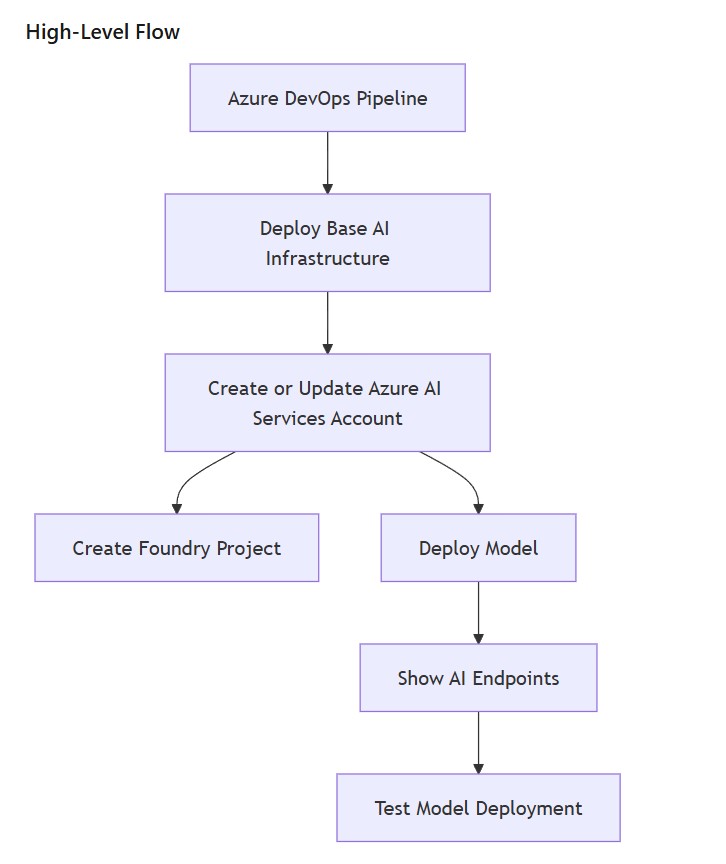
Automating a Microsoft Foundry resource, Foundry project, model deployment, endpoint output, and basic pipeline smoke test for my Azure AI infrastructure POC.
Series: Azure AI-103 infrastructure POC with Bicep, Azure DevOps, and Microsoft Foundry
Naming note: Microsoft’s AI platform naming has changed. Azure AI Studio evolved into Azure AI Foundry and is now Microsoft Foundry. In this article, I use Microsoft Foundry for the broader platform, Foundry resource for the deployable top-level Azure resource, Foundry project for the project child resource, Foundry model deployment for the model deployment, and Foundry Tools for the former Azure AI Services / Cognitive Services style capabilities. The underlying Azure Resource Manager provider still appears as Microsoft.CognitiveServices/accounts, so Bicep templates, Azure CLI commands, validation messages, and deployment logs may still use the Cognitive Services provider name.
In the first part of this POC, I focused on the base infrastructure: resource groups, a Foundry resource, Azure AI Search, Storage, Application Insights, App Service Plan, Function App, Bicep modules, tokenised parameter files, preview/deploy stages, validation, and What-If.
That gave me a working Microsoft Foundry and Azure AI platform foundation. The next logical step was to move slightly higher up the stack and automate the Foundry-specific parts: configuring the Foundry resource for project management, creating the Foundry project, deploying a model, outputting the endpoint details, and running a basic smoke test from the Azure DevOps pipeline.
This is where the POC starts to connect more directly with the Plan and manage an Azure AI solution area of the Microsoft AI-103 exam objectives. The point is not only to know that Foundry projects and model deployments exist, but to understand how they fit into an automated platform deployment.

Where This Fits in the Learning Path, Including AI-103 Exam Study
The earlier infrastructure deployment work was mostly about creating a repeatable foundation. This part is about moving from generic AI infrastructure into a more practical Foundry setup.
The Microsoft exam section I am preparing for includes areas such as choosing the right Foundry services, setting up AI solutions in Foundry, designing infrastructure for AI apps and agent-based solutions, choosing deployment options, configuring model and agent deployments, and integrating Foundry projects with CI/CD pipelines.
This POC does not cover every item in that section yet. For example, I have not added safety evaluators, agent tool-access governance, private networking, managed identity model access, or full monitoring of grounding quality. Those are later topics. What I added here is a focused step: automate the basic Foundry resource path and prove that the deployed model can be reached from the pipeline.
What I Added in This Phase
In the previous phase, the pipeline was already able to deploy the base Azure AI infrastructure. For this phase, I kept the scope deliberately small and focused on the next layer: creating a Foundry project, deploying a model, and proving that the model can be reached from the pipeline.
Foundry and Model Deployment Changes
The following changes were added to the existing Bicep and Azure DevOps structure:
- Updated the Foundry resource module to support Foundry project management.
- Added a dedicated Bicep module for a Foundry project.
- Added a dedicated Bicep module for a model deployment.
- Added variables for the Foundry project name, model name, model version, SKU, and capacity.
- Updated the main Bicep parameter file so the new values can be injected by the pipeline.
- Added a pipeline step to output the Foundry endpoint and model deployment details.
- Added a pipeline step to call the deployed model as a basic smoke test.
This is not a full agentic AI platform yet. It is a controlled next step: the POC now moves from “the infrastructure exists” to “a Foundry project and model deployment can be created and tested through CI/CD”.
Template and Variable Naming Update
To keep the repository aligned with the current Microsoft Foundry naming, I would now use the following names in the infrastructure code:
Modules/foundry-resource.bicep
Modules/foundry-project.bicep
Modules/foundry-model-deployment.bicep

FoundryResourceName
FoundryResourceLocation
FoundryProjectName
FoundryProjectDisplayName
FoundryProjectDescription
ModelDeploymentName
ModelDeploymentSkuName
ModelDeploymentCapacity
The important nuance is that the Bicep module name can use the modern Foundry terminology, while the resource declaration inside the module still uses the Azure Resource Manager provider type Microsoft.CognitiveServices/accounts. That is expected and not a mismatch.
Updated Deployment Flow
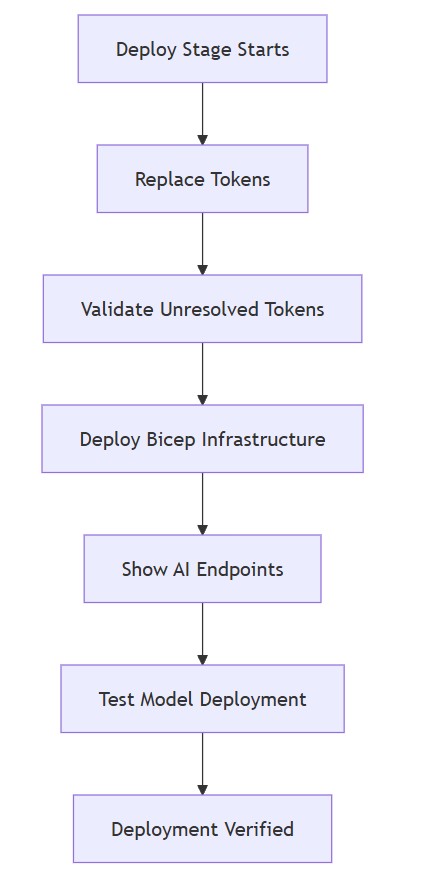
The diagram below shows the new deploy-stage flow. After the Bicep deployment completes, the pipeline outputs the Foundry endpoint details and then performs a simple model smoke test.
Design Decision: Keep Foundry Automation in the Infrastructure Pipeline
At this stage, I decided to keep the Foundry project and model deployment inside the same Bicep-driven infrastructure pipeline. I could have created the Foundry project manually in the portal, but that would defeat the purpose of the POC.
The aim is to practise what a controlled deployment pattern might look like. If the resource group, Foundry resource, Search service, and Function App are created by Bicep, then the Foundry project and model deployment should also be represented as code.
That does not mean every future AI activity belongs in Bicep. Index creation, prompt flow changes, evaluations, application code, and agent instructions may have their own lifecycle later. But the platform-level resources and model deployment configuration belong in the same source-controlled deployment story.
Updating the Foundry Resource Module
The first change was to update the Foundry resource module so that it can manage Foundry projects. In the first article, this module was named ai-services.bicep. With the current Microsoft Foundry terminology, I would now name it foundry-resource.bicep. The underlying resource still uses Microsoft.CognitiveServices/accounts with kind: 'AIServices', but in the platform design it is clearer to describe it as a Foundry resource.
For Foundry project management, I added project management support to the account properties.
resource foundryResource 'Microsoft.CognitiveServices/accounts@2025-06-01' = {
  name: name
  location: location
  kind: 'AIServices'
  sku: {
    name: skuName
  }
  identity: {
    type: 'SystemAssigned'
  }
  properties: {
    allowProjectManagement: true
    customSubDomainName: name
    disableLocalAuth: false
    publicNetworkAccess: 'Enabled'
    networkAcls: {
      defaultAction: 'Allow'
    }
  }
  tags: tags
}
This is still intentionally simple. It keeps public network access enabled for the POC and uses a system-assigned identity. Private networking, managed identity access patterns, and stricter security controls are later improvements.
Adding a Foundry Project Module
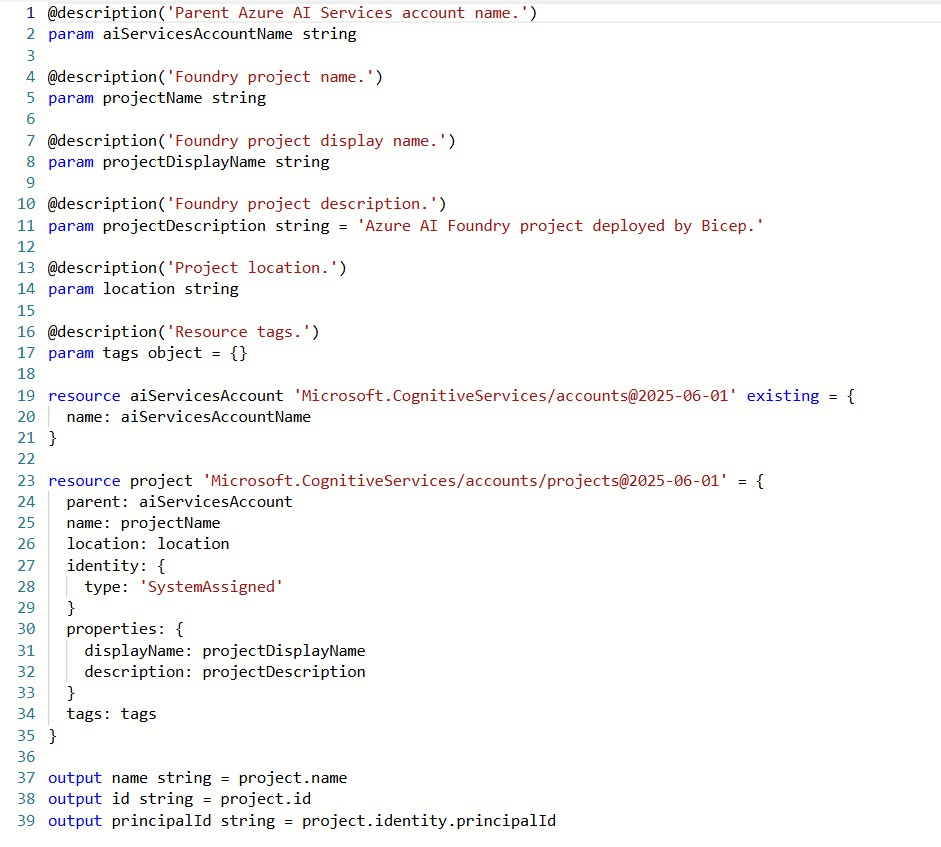
The next step was to create a dedicated Bicep module for the Foundry project. I wanted this as a separate module instead of burying the project resource directly in main.bicep. That keeps the root file easier to read and gives me a cleaner structure if I later add more Foundry-specific resources.
resource foundryResource 'Microsoft.CognitiveServices/accounts@2025-06-01' existing = {
  name: foundryResourceName
}

resource project 'Microsoft.CognitiveServices/accounts/projects@2025-06-01' = {
  parent: foundryResource
  name: projectName
  location: location
  identity: {
    type: 'SystemAssigned'
  }
  properties: {
    displayName: projectDisplayName
    description: projectDescription
  }
  tags: tags
}
The project is created under the Foundry resource. The pipeline supplies the project name, display name, description, location, and tags through the same tokenised parameter approach I used in the first part of the POC.
Verifying the Foundry Project in Azure
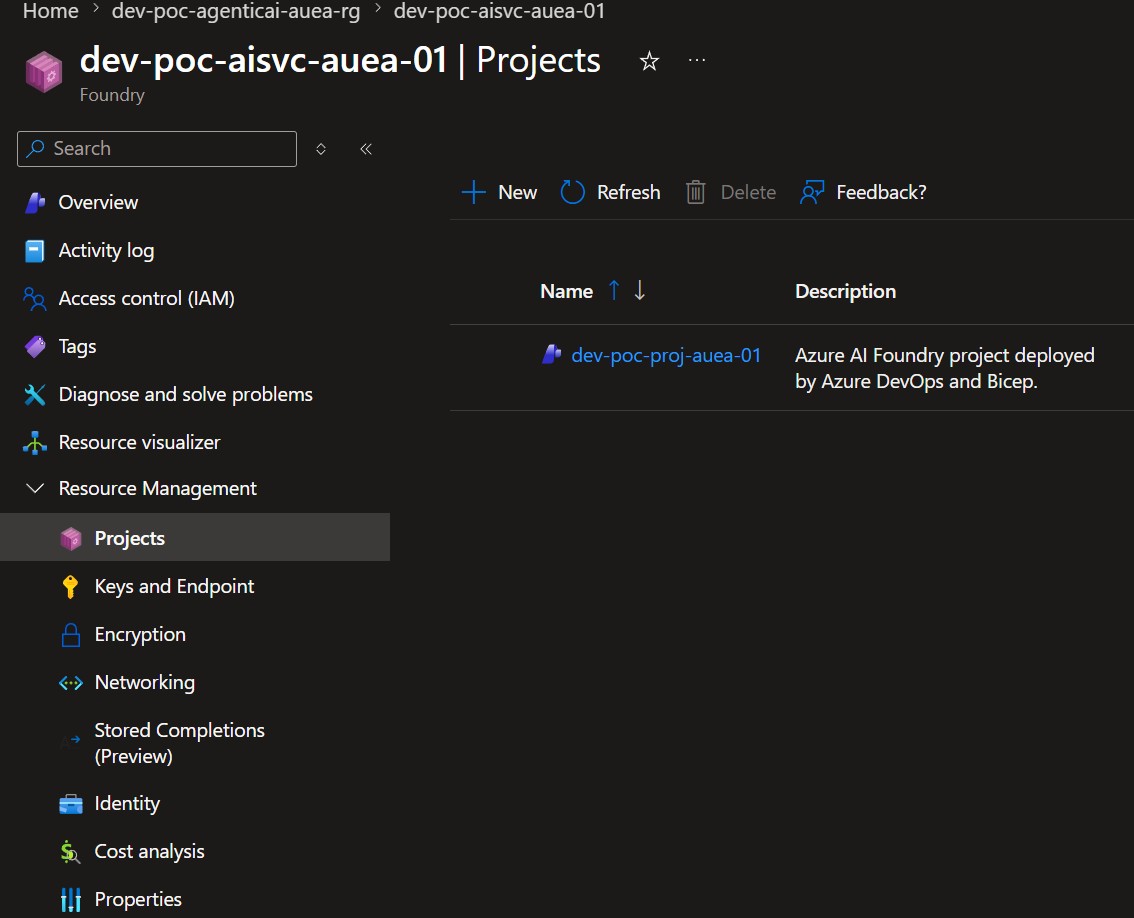
After the pipeline completed, I checked the Foundry resource in the Azure portal. Under Resource Management > Projects, the Foundry project created by Bicep was visible under the parent Foundry resource.
This was a useful checkpoint because it confirmed that the project was not created manually in the portal. It was deployed through the same Azure DevOps and Bicep flow as the rest of the infrastructure.
In this example, the project name follows the same naming convention used across the POC:
dev-poc-proj-auea-01
The description also confirms the deployment intent:
Azure AI Foundry project deployed by Azure DevOps and Bicep.
This is a small detail, but it matters. At this point, the POC is no longer just creating an Foundry resource. It is creating a Foundry project as part of the repeatable platform deployment.
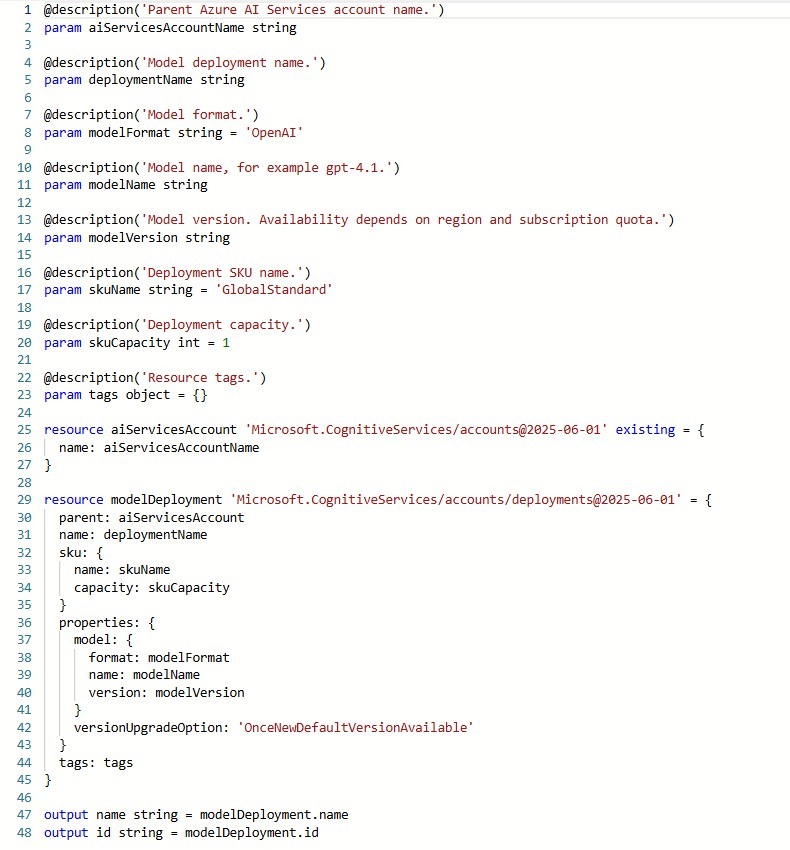
Adding a Foundry Model Deployment Module
After the project module, I added a model deployment module. This is where the POC starts to touch the “choose and configure model deployments” part of the exam objectives.
For the first pass, I kept the model values parameterised. I do not want the Bicep file hardcoded to one model forever. Model availability, quota, SKU, and version can all change depending on region and subscription limits, so the model settings belong in variables.
resource modelDeployment 'Microsoft.CognitiveServices/accounts/deployments@2025-06-01' = {
  parent: foundryResource
  name: deploymentName
  sku: {
    name: skuName
    capacity: skuCapacity
  }
  properties: {
    model: {
      format: modelFormat
      name: modelName
      version: modelVersion
    }
    versionUpgradeOption: 'OnceNewDefaultVersionAvailable'
  }
  tags: tags
}
For the POC, I used a model deployment variable set similar to this:
ModelDeploymentName: gpt-4-1
ModelFormat: OpenAI
ModelName: gpt-4.1
ModelVersion: '2025-04-14'
ModelDeploymentSkuName: GlobalStandard
ModelDeploymentCapacity: 1
This is a practical place to expect errors during testing. If the model, version, SKU, or quota is not available for the target account or region, the deployment will fail. That is not necessarily a bad result. It is exactly the type of platform feedback I want to see while learning how model deployments behave.
Extending the Existing Parameter Pattern
I reused the same tokenised parameter pattern from the first part of the POC. The main Bicep parameter file now includes project and model deployment values:
param foundryProjectName = '#{FoundryProjectName}#'
param foundryProjectDisplayName = '#{FoundryProjectDisplayName}#'
param foundryProjectDescription = '#{FoundryProjectDescription}#'

param modelDeploymentName = '#{ModelDeploymentName}#'
param modelFormat = '#{ModelFormat}#'
param modelName = '#{ModelName}#'
param modelVersion = '#{ModelVersion}#'
param modelDeploymentSkuName = '#{ModelDeploymentSkuName}#'
param modelDeploymentCapacity = #{ModelDeploymentCapacity}#
The matching values are built from the variable templates, just like the resource names in the infrastructure phase:
FoundryProjectName: $(EnvCode)-$(ZoneCode)-proj-$(RegionCode)-$(InstanceNumber)
FoundryProjectDisplayName: $(EnvCode)-$(RegionCode) Agentic AI Project

ModelDeploymentName: gpt-4-1
ModelFormat: OpenAI
ModelName: gpt-4.1
ModelVersion: '2025-04-14'
ModelDeploymentSkuName: GlobalStandard
ModelDeploymentCapacity: 1
This keeps the Bicep module reusable and lets me change the model settings without rewriting the deployment logic.
Wiring the Modules into main.bicep
In the root main.bicep, the Foundry project and Foundry model deployment modules are called after the Foundry resource is created.
module foundryProject 'Modules/foundry-project.bicep' = {
  name: '${resourcePrefix}-foundry-project'
  params: {
    foundryResourceName: foundryResource.outputs.name
    projectName: foundryProjectName
    projectDisplayName: foundryProjectDisplayName
    projectDescription: foundryProjectDescription
    location: foundryResourceLocation
    tags: commonTags
  }
}

module modelDeployment 'Modules/foundry-model-deployment.bicep' = {
  name: '${resourcePrefix}-model-deployment'
  params: {
    foundryResourceName: foundryResource.outputs.name
    deploymentName: modelDeploymentName
    modelFormat: modelFormat
    modelName: modelName
    modelVersion: modelVersion
    skuName: modelDeploymentSkuName
    skuCapacity: modelDeploymentCapacity
    tags: commonTags
  }
}
I kept the model deployment under the Foundry resource location, not the generic regional deployment location. This is consistent with the earlier regional lesson: Foundry and AI resources may need separate handling instead of blindly following every application region.
Pipeline Step: Show Foundry Endpoints
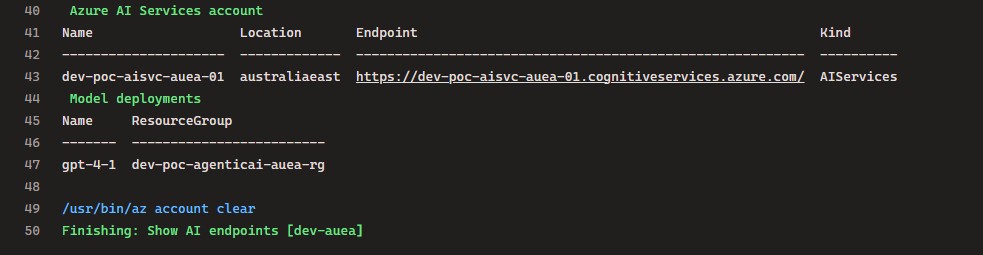
After the Bicep deployment, I added a simple Azure CLI step to output the Foundry resource details and model deployments. The Azure CLI command group still uses az cognitiveservices, which reflects the underlying provider name rather than the current product branding. This is not a replacement for observability, but it is useful during the POC because it gives immediate feedback in the pipeline logs.
az cognitiveservices account show `
  --name "$(FoundryResourceName)" `
  --resource-group "$(ResourceGroupName)" `
  --query "{name:name, location:location, endpoint:properties.endpoint, kind:kind}" `
  --output table

az cognitiveservices account deployment list `
  --name "$(FoundryResourceName)" `
  --resource-group "$(ResourceGroupName)" `
  --output table
At this point, I want the pipeline to tell me which account was deployed, where it is located, what endpoint was created, and which model deployments exist.
Pipeline Step: Smoke Test the Model
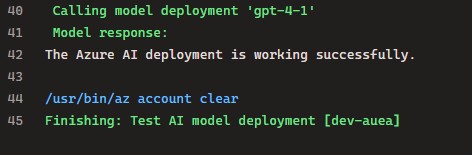
The final addition was a basic smoke test. After deployment, the pipeline retrieves the Foundry endpoint and key, then calls the deployed model. For a quick POC, a key-based chat completions call still proves the deployment path. For newer Microsoft Foundry application code, I would plan to move toward the project endpoint pattern, Entra ID authentication, and the OpenAI v1 / Responses API style where supported.
For now, this is deliberately simple. It is not a full application test, not an evaluation framework, and not a responsible AI test. It is just a fast check that the deployment is reachable and capable of returning a response.
$endpoint = az cognitiveservices account show `
  --name $foundryResourceName `
  --resource-group $resourceGroupName `
  --query "properties.endpoint" `
  --output tsv

$key = az cognitiveservices account keys list `
  --name $foundryResourceName `
  --resource-group $resourceGroupName `
  --query "key1" `
  --output tsv

$uri = "$endpoint/openai/deployments/$deploymentName/chat/completions?api-version=2025-01-01-preview"

# Longer-term target for application code:
# https://<foundry-resource-name>.services.ai.azure.com/api/projects/<project-name>/openai/v1/responses

$response = Invoke-RestMethod -Method Post -Uri $uri -Headers $headers -Body $body
In a production design, I would not leave this as a key-based test in the pipeline. I would move towards managed identity, Key Vault, or another controlled access pattern. For a learning POC, this is acceptable as a temporary smoke test because it proves the deployment path end to end.
One thing I would adjust in a later version is the API surface used by the application code. The current Microsoft Foundry direction is a project endpoint such as https://<resource-name>.services.ai.azure.com/api/projects/<project-name>, with newer SDK and OpenAI v1 / Responses API patterns where the selected model and region support them. I would keep the simple chat completions smoke test only as a temporary deployment verification step, not as the final application integration pattern.
Updated Pipeline Behaviour
After adding the Foundry project and model deployment modules, the pipeline flow changed slightly. The preview stage still acts as the safety gate, while the deploy stage now also performs a basic post-deployment verification.
Preview Stage
The preview stage is still focused on checking the deployment before anything is applied. It replaces tokens, validates the generated parameter files, creates the resource group if required, validates the Bicep deployment, and runs What-If.
Preview stage:
  replace tokens
  validate unresolved tokens
  create resource group if missing
  validate Bicep
  What-If
Deploy Stage
The deploy stage now goes further than the original infrastructure deployment. After deploying the Bicep resources, it outputs the Foundry endpoint details and runs a simple smoke test against the deployed model.
Deploy stage:
  replace tokens
  validate unresolved tokens
  deploy infrastructure
  show Foundry endpoints
  test model deployment
This split keeps the pipeline clean. Preview is for review and validation. Deploy is for applying the change and proving that the Foundry-backed model deployment is reachable.
Stages Flow
The diagram below shows the updated stages flow. The important difference is that the pipeline no longer stops at resource deployment. It also checks the deployed AI endpoint and confirms that the model can return a response.

How This Maps to the Exam Section
This part of the POC maps to the Plan and manage an Azure AI solution section more directly than the first infrastructure-only phase.
| Exam area | What this POC now covers |
|---|---|
| Choose Foundry services for generative AI and agents | Uses an Foundry resource as the Foundry-capable parent resource. |
| Set up AI solutions in Foundry | Adds a Foundry project as code using a Bicep child resource. |
| Choose appropriate deployment options | Adds a model deployment module with parameterised model, version, SKU, and capacity. |
| Configure model deployments | Deploys a named Foundry model deployment under the Foundry resource. |
| Integrate Foundry projects with CI/CD pipelines | Runs the project and model deployment from Azure DevOps as part of the infrastructure pipeline. |
| Manage quotas, scaling, rate limits, and cost footprint | Introduces SKU and capacity as variables, but does not fully manage quotas yet. |
| Monitor, secure, and govern AI systems | Not fully implemented yet. This remains a future phase with managed identity, private networking, monitoring, and safety controls. |
This is important because the POC should not pretend to cover the entire exam section. It covers the first practical slice: Foundry setup, model deployment, CI/CD integration, endpoint visibility, and a basic smoke test.
What This Does Not Cover Yet
There are still several important areas missing, and I want to keep them explicit:
- No agent resource or agent workflow yet.
- No Foundry Tools integration yet.
- No retrieval or indexing automation beyond the existing Azure AI Search resource.
- No vector index creation yet.
- No managed identity based model access yet.
- No private endpoint pattern yet.
- No safety filters, guardrails, or evaluator pipeline yet.
- No drift, grounding quality, or relevance monitoring yet.
- No approval workflow for model changes yet.
- No detailed quota and cost governance yet.
That is fine. Those are later phases. The important thing is that the POC now has a place to build from.
Lessons from This Phase
The main lesson from this phase is that Foundry resource, project, and model deployment automation should be treated as part of platform engineering, not as a separate portal-only activity.
If the Foundry resource, project, and model deployment are created manually, the environment becomes hard to reproduce. If they are created through the pipeline, the deployment becomes repeatable, reviewable, and easier to promote across environments.
The second lesson is that model deployment is where platform constraints become very real. Model name, version, SKU, capacity, region, and quota all matter. That is why I kept those values as variables instead of embedding them directly in the module.
The third lesson is that a smoke test is worth adding early. It is not enough for Azure Resource Manager to say the resource deployed. I want the pipeline to prove that the endpoint exists and the model deployment can respond.
Next Steps
The next phase should build on this without making the POC too large at once. The logical next improvements are:
- Add a simple application endpoint in the Function App that calls the deployed model.
- Add AI Search index creation and a small retrieval test.
- Move the smoke test away from key-based authentication.
- Add Key Vault or managed identity based access.
- Add RBAC modules for the Function App identity.
- Add basic monitoring around model calls.
- Add an initial safety or evaluation step after model deployment.
Those improvements would move the POC further into agentic AI and responsible AI territory. For now, this phase gives me the Foundry project and model deployment automation layer I needed before moving into more advanced scenarios.
Final Thoughts
This continuation of the POC was useful because it moved the work beyond pure infrastructure. The first part proved that I could deploy a small Microsoft Foundry and Azure AI platform foundation. This part started to automate the Foundry layer on top of it.
There is still a long way to go before this resembles a mature AI platform, but the direction is right. The deployment is now closer to how I would want to learn and manage Microsoft Foundry and Azure AI in a real engineering environment: source-controlled, parameterised, deployed through Azure DevOps, and tested by the pipeline.
That is the kind of learning that sticks.