

Adding a dedicated RBAC layer to my Microsoft Foundry and Azure AI-103 infrastructure POC using Bicep, Azure DevOps, Microsoft Entra groups, and least-privilege role assignments.
Series: Azure AI-103 infrastructure POC with Bicep, Azure DevOps, and Microsoft Foundry
Naming note: Microsoft’s AI platform naming has changed. Azure AI Studio evolved into Microsoft Foundry and is now Microsoft Foundry. In this article, I use Microsoft Foundry for the broader platform, Foundry resource for the deployable top-level Azure resource, Foundry project for the project child resource, and Foundry model deployment for the model deployment. The underlying Azure Resource Manager provider still appears as Microsoft.CognitiveServices/accounts, and some Azure CLI commands still use az cognitiveservices. That is expected and does not mean the article should keep the older Foundry resource wording everywhere.
RBAC naming note: Microsoft recently renamed the Foundry RBAC roles. Foundry User, Foundry Owner, Foundry Account Owner, and Foundry Project Manager were previously named Azure AI User, Azure AI Owner, Azure AI Account Owner, and Azure AI Project Manager. The role IDs and core permissions are unchanged, so the safest automation pattern is to use role definition IDs instead of relying on display names during the rename rollout.
In the previous phases of this Microsoft Foundry and Azure AI infrastructure POC, I focused on deploying the platform foundation: a resource group, a Foundry resource, a Microsoft Foundry project, Azure AI Search, Application Insights, Storage, and also model deployments with a basic model smoke test from Azure DevOps.
That proved that the infrastructure could be deployed and that a deployed model could be called successfully.
The next step is access control.
For an Microsoft Foundry and Azure AI platform, especially one that may later support agents, RAG, model deployments, indexing pipelines, and application runtimes, RBAC cannot be an afterthought. It needs to be planned, defined, reviewed, and deployed in the same repeatable way as the infrastructure itself.
This post covers how I added a dedicated RBAC layer to the POC using:
- Microsoft Entra security groups
- JSON configuration files
- Microsoft Learn-verified Azure role IDs
- Bicep role assignments
- Azure DevOps step templates
- least-privilege scope design
The result is a more realistic Microsoft Foundry and Azure AI platform deployment pattern, and it also maps directly to the AI-103 exam focus on planning, managing, securing, monitoring, and operationalising Azure AI solutions.
How This Fits AI-103 Exam Objectives
The official AI-103 study guide describes the target candidate as an Azure AI engineer who builds, manages, and deploys agents and AI solutions that use Microsoft Foundry. It also says the role collaborates with DevOps engineers and cloud security engineers to design, implement, and maintain AI solutions.
The study guide lists Plan and manage an Azure AI solution as 25–30% of the exam. Under that area, it includes designing Azure infrastructure for AI apps and agents, configuring model and agent deployments, integrating Foundry projects with CI/CD pipelines, monitoring model/search/ingestion quality, and configuring security including managed identity, private networking, keyless credentials, and role policies.
| AI-103 objective area | How this RBAC phase supports it |
|---|---|
| Plan and manage an Azure AI solution | Defines a practical access model for Foundry, model access, Azure AI Search, Storage, and monitoring. |
| Set up AI solutions in Foundry | Adds repeatable access control around Foundry resources deployed through Bicep and Azure DevOps. |
| Integrate Foundry projects with CI/CD pipelines | Moves RBAC from manual portal configuration into the Azure DevOps deployment flow. |
| Manage, monitor, and secure AI systems | Applies security groups, role assignments, least privilege, and scoped access to AI resources. |
| Build retrieval and grounding pipelines | Uses Azure AI Search data roles to separate index writers from index readers. |
| Optimize and operationalize generative AI systems | Makes access control repeatable, auditable, and aligned with infrastructure-as-code practices. |
RBAC Best Practices Used
The RBAC design follows four Microsoft Learn best practices that matter in real Azure environments:
| Best practice | How I applied it in the POC |
|---|---|
| Grant least privilege | Different groups receive different roles depending on whether they administer Foundry, call model deployments, write search indexes, read search indexes, read secrets, or view monitoring data. |
| Assign roles to groups, not users | Users are managed through Microsoft Entra groups. Azure role assignments target groups instead of individual user accounts. |
| Use role IDs in automation | The JSON config remains readable with friendly role names, but the pipeline maps role names to stable built-in role definition IDs before deploying Bicep. |
| Use narrow scopes | Roles are assigned at the Foundry resource, Search service, Storage account, Application Insights component, or resource group scope instead of the subscription where possible. |
This explains why many production environments use a role mapping file. Humans prefer readable names such as Foundry User. Automation should use stable role IDs such as 53ca6127-db72-4b80-b1b0-d745d6d5456d, especially while the Foundry role-name rollout continues.
Repository Structure Added for RBAC
I kept the RBAC implementation separate from the main infrastructure deployment. The main Bicep template deploys the AI platform resources. The RBAC deployment assigns access after those resources exist.
Infra
├── Bicep
│   └── foundry-rbac-role-assignments.bicep
├── Rbac
│   ├── foundry-security-groups.json
│   ├── azure-role-map.json
│   └── foundry-role-assignments.json
└── Steps
    ├── step-create-foundry-security-groups.yml
    └── step-assign-foundry-rbac.yml
This separation keeps the pipeline easier to troubleshoot and makes it clear that access control is a distinct platform concern.
I originally used generic file names such as role_assignments.bicep, security-groups.json, role-assignments.json, step-create-security-groups.yml, and step-assign-rbac.yml. For this updated Microsoft Foundry version, I would use the clearer names shown above. The naming makes it obvious that this RBAC layer is part of the Foundry and Azure AI platform pattern, not a random subscription-wide RBAC script.
Security Groups Used in the POC
The groups follow the same naming convention used elsewhere in the POC:
At this stage of the POC, the RBAC configuration still includes both Foundry access groups and supporting runtime groups for model access, RAG, storage, and monitoring. However, for the Foundry-specific part of the design, the important roles are Foundry Owner and Foundry User.
#{EnvCode}#-#{ZoneCode}#-ai-<purpose>For the development environment, this creates names such as:
dev-poc-ai-foundry-account-owners
dev-poc-ai-foundry-project-managers
dev-poc-ai-foundry-users
dev-poc-ai-model-users
dev-poc-ai-rag-indexers
dev-poc-ai-rag-readers
dev-poc-ai-storage-contributors
dev-poc-ai-monitor-readers
| Security group | Purpose | Typical role | Typical scope |
|---|---|---|---|
dev-poc-ai-foundry-account-owners |
Platform administrators who manage the Foundry resource, projects, model management, and account-level configuration. | Foundry Account Owner | Foundry resource scope |
dev-poc-ai-foundry-project-managers |
Lead developers or project owners who manage Foundry projects and can assign Foundry User within the allowed conditions. | Foundry Project Manager | Foundry resource or project scope |
dev-poc-ai-foundry-users |
Users who build and work inside Foundry projects. | Foundry User | Foundry project scope where possible, plus Reader on the Foundry resource if needed |
dev-poc-ai-model-users |
Users or identities that call model deployments directly. | Cognitive Services OpenAI User | Foundry resource |
dev-poc-ai-rag-indexers |
Users or identities that write documents to Azure AI Search indexes. | Search Index Data Contributor | Azure AI Search service |
dev-poc-ai-rag-readers |
Users or identities that query Azure AI Search index data. | Search Index Data Reader | Azure AI Search service |
dev-poc-ai-storage-contributors |
Users or identities that upload or manage source documents. | Storage Blob Data Contributor | Storage account |
dev-poc-ai-monitor-readers |
Operations users who need read access to logs and metrics. | Monitoring Reader | Resource group |
Verified Role Map for Common AI-103 / Foundry Study Scenarios
The following role IDs were checked against Microsoft Learn built-in role documentation. In this POC, I keep the role map broader than the Foundry-only access model because later phases may need runtime, RAG, storage, and monitoring permissions. The active Foundry project-access roles remain deliberately small, but the map can safely include other verified roles for future use.
{
  "Foundry User": "53ca6127-db72-4b80-b1b0-d745d6d5456d",
  "Foundry Project Manager": "eadc314b-1a2d-4efa-be10-5d325db5065e",
  "Foundry Account Owner": "e47c6f54-e4a2-4754-9501-8e0985b135e1",
  "Foundry Owner": "c883944f-8b7b-4483-af10-35834be79c4a",
  "Cognitive Services OpenAI User": "5e0bd9bd-7b93-4f28-af87-19fc36ad61bd",
  "Search Service Contributor": "7ca78c08-252a-4471-8644-bb5ff32d4ba0",
  "Search Index Data Contributor": "8ebe5a00-799e-43f5-93ac-243d3dce84a7",
  "Search Index Data Reader": "1407120a-92aa-4202-b7e9-c0e197c71c8f",
  "Storage Blob Data Reader": "2a2b9908-6ea1-4ae2-8e65-a410df84e7d1",
  "Storage Blob Data Contributor": "ba92f5b4-2d11-453d-a403-e96b0029c9fe",
  "Monitoring Reader": "43d0d8ad-25c7-4714-9337-8ba259a9fe05"
}
Important note about Azure AI Developer, Cognitive Services, and Azure OpenAI roles
Azure AI Developer and Cognitive Services roles may appear during study, in the Azure portal, or in older examples. However, for this Foundry project POC, I would not treat them as the main project-access roles. Microsoft’s current Foundry RBAC guidance says not to use the Cognitive Services built-in roles or the Azure AI Developer role for Foundry project work. For Foundry project access, use Foundry-specific roles such as Foundry User, Foundry Project Manager, Foundry Account Owner, or Foundry Owner, depending on the responsibility.
This distinction matters because Foundry project access and Azure OpenAI service access are not always the same thing. Foundry roles are used to control what a user can do inside a Foundry account or project, such as working with projects, assets, models, agents, and related Foundry resources. Azure OpenAI and Cognitive Services roles are more relevant when access is required directly against the Azure OpenAI or Foundry resource itself.
For example, Cognitive Services OpenAI User is commonly used when an identity needs to call Azure OpenAI models, such as sending prompts to a deployed model endpoint. Cognitive Services OpenAI Contributor is more privileged and is generally used when an identity needs broader Azure OpenAI management capabilities, such as working with deployments or service-level configuration. These roles should normally be scoped carefully to the specific Azure OpenAI or Foundry resource rather than assigned broadly at the subscription or resource group level.
In a real solution, these Azure OpenAI roles may be combined with other service-specific roles depending on the architecture. For example, a RAG solution may also require Search Index Data Reader or Search Index Data Contributor for Azure AI Search, Storage Blob Data Reader or Storage Blob Data Contributor for storage-backed content, and Monitoring Reader or Log Analytics roles for observability.
For this reason, I keep the Foundry project-access roles conceptually separate from runtime and supporting-service roles. The Foundry access model focuses on who can access and manage the Foundry project, while Azure OpenAI, Search, Storage, and Monitoring roles support later runtime, RAG ingestion, data access, and operational monitoring scenarios.
Recommended Role Assignments for This POC
For this POC, I started with a broader but still structured set of Entra ID groups. The Foundry access model is intentionally small, with separate groups for Foundry administrators and Foundry users. The same RBAC configuration also includes supporting groups for model access, RAG indexing, RAG querying, storage-backed content, and monitoring.
For Microsoft Foundry-specific permissions, I used the official Microsoft Foundry RBAC guidance as the reference point, rather than assigning broad permissions by default.
The important point is that this section treats Foundry access as the starting point, but the current POC also includes supporting runtime roles for model access, Azure AI Search, Storage, and monitoring. Those roles are separated by group and scope so they can be reviewed, removed, or expanded independently as the POC evolves.
| Scenario | Most relevant role | Role ID | Why it matters |
|---|---|---|---|
| Account-level Foundry administration | Foundry Account Owner | e47c6f54-e4a2-4754-9501-8e0985b135e1 |
Grants full access to manage Foundry projects and resources and conditionally assign selected roles, without giving the same build/development capability as Foundry Owner. |
| Foundry project management | Foundry Project Manager | eadc314b-1a2d-4efa-be10-5d325db5065e |
Lets lead developers or project owners manage Foundry projects, build in projects, publish agents, and conditionally assign Foundry User. |
| Full administration plus build/development capability | Foundry Owner | c883944f-8b7b-4483-af10-35834be79c4a |
Grants the broadest Foundry access: manage projects and resources, build and develop in projects, manage models, publish agents, and conditionally assign selected roles. |
| Normal Foundry project user | Foundry User | 53ca6127-db72-4b80-b1b0-d745d6d5456d |
Provides least-privilege access for users who need to work with Foundry projects and perform project data actions without managing the platform. |
| Direct model access | Cognitive Services OpenAI User | 5e0bd9bd-7b93-4f28-af87-19fc36ad61bd |
Useful when a user or identity needs to call deployed Azure OpenAI / Foundry resource model endpoints directly. |
| RAG indexing | Search Index Data Contributor | 8ebe5a00-799e-43f5-93ac-243d3dce84a7 |
Allows an ingestion identity to upload, update, or delete documents in Azure AI Search indexes. |
| RAG querying | Search Index Data Reader | 1407120a-92aa-4202-b7e9-c0e197c71c8f |
Allows query-only access to Azure AI Search index data. |
| Storage-backed source content | Storage Blob Data Contributor | ba92f5b4-2d11-453d-a403-e96b0029c9fe |
Allows upload and management of source documents stored in Azure Storage. |
| Monitoring read access | Monitoring Reader | 43d0d8ad-25c7-4714-9337-8ba259a9fe05 |
Allows operations users to view monitoring data without giving them contributor access. |
The active assignment configuration currently looks like this:
[
  {
    "principalDisplayName": "#{EnvCode}#-#{ZoneCode}#-ai-foundry-account-owners",
    "principalType": "Group",
    "roleName": "Foundry Account Owner",
    "scopeType": "FoundryResource"
  },
  {
    "principalDisplayName": "#{EnvCode}#-#{ZoneCode}#-ai-foundry-project-managers",
    "principalType": "Group",
    "roleName": "Foundry Project Manager",
    "scopeType": "FoundryResource"
  },
  {
    "principalDisplayName": "#{EnvCode}#-#{ZoneCode}#-ai-foundry-users",
    "principalType": "Group",
    "roleName": "Foundry User",
    "scopeType": "FoundryProject"
  },
  {
    "principalDisplayName": "#{EnvCode}#-#{ZoneCode}#-ai-model-users",
    "principalType": "Group",
    "roleName": "Cognitive Services OpenAI User",
    "scopeType": "FoundryResource"
  },
  {
    "principalDisplayName": "#{EnvCode}#-#{ZoneCode}#-ai-rag-indexers",
    "principalType": "Group",
    "roleName": "Search Index Data Contributor",
    "scopeType": "SearchService"
  },
  {
    "principalDisplayName": "#{EnvCode}#-#{ZoneCode}#-ai-rag-readers",
    "principalType": "Group",
    "roleName": "Search Index Data Reader",
    "scopeType": "SearchService"
  },
  {
    "principalDisplayName": "#{EnvCode}#-#{ZoneCode}#-ai-storage-contributors",
    "principalType": "Group",
    "roleName": "Storage Blob Data Contributor",
    "scopeType": "StorageAccount"
  },
  {
    "principalDisplayName": "#{EnvCode}#-#{ZoneCode}#-ai-monitor-readers",
    "principalType": "Group",
    "roleName": "Monitoring Reader",
    "scopeType": "ResourceGroup"
  }
]
The active assignment example includes both the small Foundry access model and the supporting runtime roles currently used by the POC. The important point is that each access type is separated by group and scope, so Foundry administration, Foundry usage, model access, RAG indexing, RAG querying, storage access, and monitoring can be managed independently.
This keeps the current RBAC configuration aligned with the purpose of this phase: making access control repeatable while avoiding broad subscription-level permissions.
Bicep Role Assignments
The RBAC Bicep template receives role assignments grouped by scope. This avoids hardcoding every role assignment as a separate Bicep resource and keeps the template reusable.
The key part is the deterministic role assignment name:
name: guid(scope().id, assignment.scopeId, assignment.principalId, assignment.roleDefinitionId)This matters because role assignment resources need stable names for repeatable deployments. I include the assignment scope in the GUID so the same principal and role can be assigned at different scopes without name collisions. The Microsoft Learn role assignment template documentation shows the use of Microsoft.Authorization/roleAssignments with API version 2022-04-01, and it explains that role assignments need the target principal object ID and role definition ID.
For new service principals or managed identities, Microsoft also notes that principalType should be specified to reduce replication-delay issues. Even though this POC is currently using groups, including principalType is still a good habit.
Azure DevOps Flow
The RBAC steps run after the main infrastructure deployment and only in the main region, because the Foundry resource and Foundry project are created only in the main region in this POC.
Deploy Bicep infrastructure
  ↓
Create or validate Entra security groups
  ↓
Resolve role assignment config and role map
  ↓
Deploy RBAC assignments with Bicep
  ↓
Show Foundry endpoints
  ↓
Run model smoke test
The RBAC assignment step uses a DRY PowerShell structure with helper functions for token replacement, file validation, role definition ID lookup from the map, principal object ID resolution, assignment object creation, and scope bucket routing.
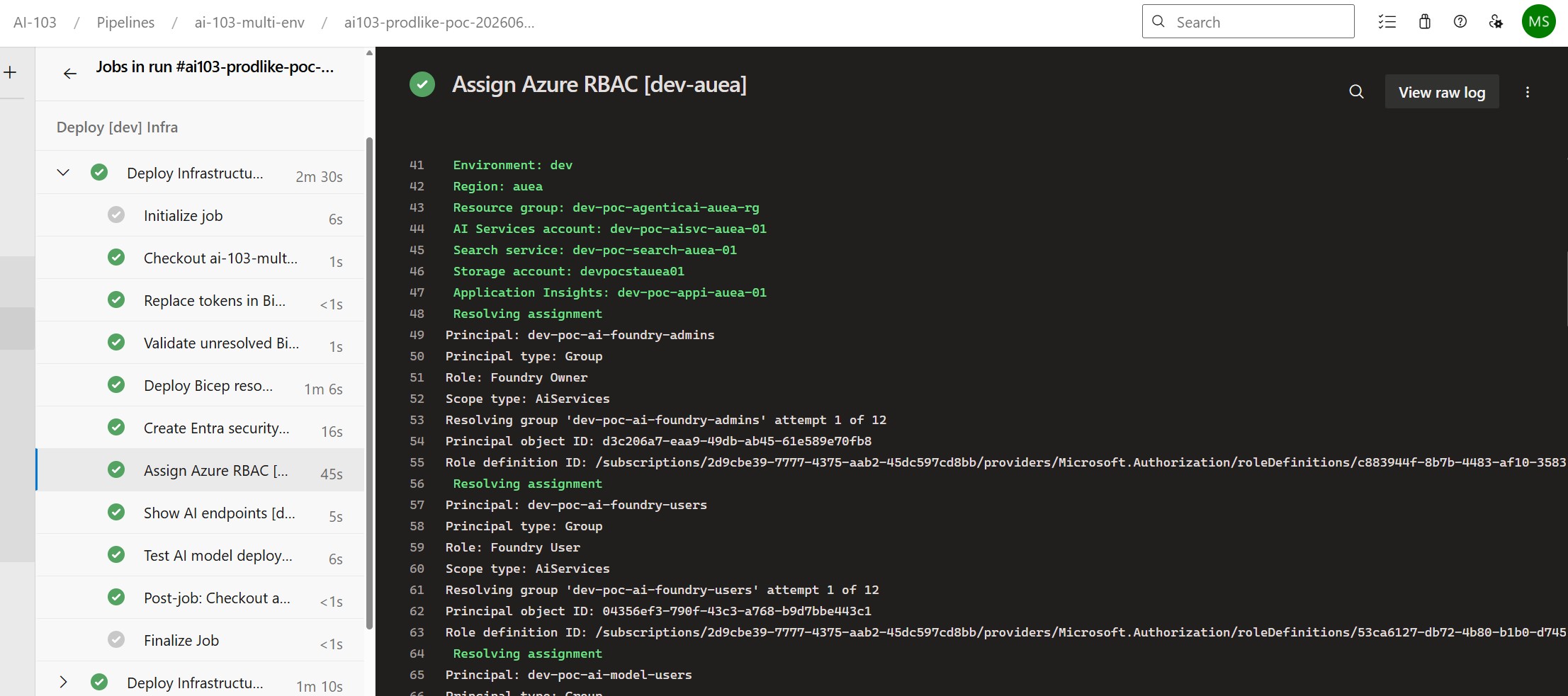
Successful RBAC Deployment from Azure DevOps
After adding the security group and RBAC assignment steps to the deployment flow, I ran the pipeline again for the development environment. The RBAC step completed successfully and assigned the configured roles to the Entra security groups.
The pipeline output confirmed that the step resolved each group, mapped the friendly role name to the correct Azure role definition ID, and deployed the role assignments through Bicep.
For the dev-auea deployment, the successful run showed the expected Foundry and supporting runtime security groups being processed:
dev-poc-ai-foundry-account-owners
dev-poc-ai-foundry-project-managers
dev-poc-ai-foundry-users
dev-poc-ai-model-users
dev-poc-ai-rag-indexers
dev-poc-ai-rag-readers
dev-poc-ai-storage-contributors
dev-poc-ai-monitor-readers
The important part is that RBAC was no longer configured manually through the Azure portal. It was created as part of the same repeatable Azure DevOps deployment flow used for the rest of the platform.

Pipeline Permission Requirements
There is an important permissions distinction here:
| Operation | Permission area | Typical requirement |
|---|---|---|
| Create Azure role assignments | Azure RBAC | Microsoft.Authorization/roleAssignments/write, typically through Role Based Access Control Administrator or User Access Administrator. |
| Read or create Entra groups | Microsoft Entra ID | Directory permissions to read groups and create groups. |
| Deploy Azure AI resources | Azure Resource Manager | Contributor or a narrower custom/platform deployment role, depending on the resource scope. |
In my testing, the service connection could deploy Azure resources but failed to query Entra groups. That is expected if the pipeline identity does not have the required Entra directory permissions.
For a production-style pattern, I would normally separate this into two flows:
| Flow | Responsibility |
|---|---|
| Identity bootstrap | Create or manage Microsoft Entra security groups. |
| Platform deployment | Assign approved groups to Azure resource roles. |
What I Would Expect to See in AI-103 Study Questions
I would not expect AI-103 to ask for every role ID from memory. However, I would expect scenario-style questions around choosing the right role and the right scope.
| Possible study scenario | Likely answer pattern | Recommended scope | Reference |
|---|---|---|---|
| A developer needs to work in a Foundry project but should not administer the account. | Use Foundry User. This is the safer least-privilege choice for normal project-level development work. Avoid using subscription Contributor. | Scope to the specific Foundry project where possible, or to the relevant Foundry resource if project-level scope is not available. | Microsoft Foundry RBAC roles |
| A platform admin needs to manage Foundry project access, deployments, or project-level settings. | Use Foundry Project Manager. This is usually the better answer when the person manages a project but should not have full account-level ownership. | Scope to the specific Foundry project or relevant Foundry resource. Avoid subscription-level scope unless the admin manages multiple Foundry resources. | Microsoft Foundry RBAC roles |
| A platform owner needs to manage the Foundry account, projects, and broader Foundry administration. | Use Foundry Account Owner when the user mainly needs account/project/resource management. Use Foundry Owner only when the user also needs full self-service development capability inside projects. Foundry Owner is more privileged overall because it combines management access with build/development capabilities. | Scope to the Foundry account or relevant Foundry resource. Use resource group or subscription scope only when broader ownership is genuinely required. | Microsoft Foundry RBAC roles |
| An application or developer needs to use a model deployment through a Foundry project. | Use the appropriate Foundry role, usually Foundry User for normal project usage. Do not use generic subscription Contributor. | Scope to the specific Foundry project where possible, or the relevant Foundry resource if project-level scope is not available. | Microsoft Foundry RBAC roles |
| An ingestion process needs to create or manage Azure AI Search indexes, indexers, skillsets, knowledge bases, or data sources. | Use Search Service Contributor. This role can create and manage search objects, but it cannot load documents, query indexes, or retrieve from knowledge bases. If the same identity also needs to load documents, add Search Index Data Contributor. | Scope to the specific Azure AI Search service. For Search Index Data Contributor or Search Index Data Reader, you can also scope to a specific index where appropriate. Avoid resource group or subscription scope unless the identity must work across multiple Search services. | Azure AI Search RBAC roles |
| An ingestion process needs to upload, update, or delete documents in an Azure AI Search index. | Use Search Index Data Contributor. This provides read-write content access. It can load documents, query indexes, and retrieve from knowledge bases, but it cannot modify object definitions or retrieve admin keys. | Scope to the specific Azure AI Search service, or to a specific index where supported and appropriate. Avoid broader resource group or subscription scope unless required. | Azure AI Search RBAC roles |
| An app only needs to query Azure AI Search index data or retrieve from a knowledge base. | Use Search Index Data Reader. This is the least-privilege role for read-only data-plane access. It can query indexes and retrieve from knowledge bases, but it cannot load documents, modify object definitions, or retrieve admin keys. | Scope to the specific Azure AI Search service, or to a specific index where supported and appropriate. Avoid assigning broader Search or Azure Contributor roles. | Azure AI Search RBAC roles |
| A runtime identity needs to read source documents from Azure Storage. | Use Storage Blob Data Reader if read-only access is enough. Use Storage Blob Data Contributor only when upload, update, or delete access is required. | Scope to the specific storage account or, preferably, the specific blob container that contains the source documents. | Assign Azure roles for blob data access |
| An operator only needs to view logs, metrics, alerts, or monitoring data. | Use Monitoring Reader. Do not use Contributor unless the operator needs to configure or modify monitoring resources. | Scope to the relevant resource, resource group, or Log Analytics workspace. Use subscription scope only if the operator must view monitoring data across the whole subscription. | Azure Monitor roles and permissions |
Note: For direct Azure OpenAI / Foundry resource access outside a Foundry project, Microsoft also has Cognitive Services roles such as Cognitive Services OpenAI User. These are separate from Foundry project RBAC. I keep them in the wider role map only for runtime/model-access scenarios, not as the default answer for Foundry project access.
Lessons Learned
1. RBAC is part of platform design
Access control affects naming, deployment order, pipeline permissions, group design, and operational handover. It should be added early, not after the platform is already in use.
2. Foundry roles matter
For new Microsoft Foundry project access, the Foundry-specific roles are the ones to understand first: Foundry User, Foundry Project Manager, Foundry Account Owner, and Foundry Owner. Use Foundry Account Owner where the user needs account/project management but does not need full build capability.
3. Azure AI Developer can be misleading
The portal may show older Azure AI role names while the rename rolls out. Microsoft’s current guidance says to use Foundry-specific roles for Foundry work and not to use Azure AI Developer for Foundry projects or hosted agents.
4. Role names are for humans; role IDs are for pipelines
A role map gives both readability and stable automation. This is why using azure-role-map.json is a sensible production-style pattern.
5. Azure permissions and Entra permissions are different
A service connection can have permission to deploy Azure resources while still being unable to query or create Entra groups.
Final Thoughts
This RBAC phase made the Microsoft Foundry POC feel much closer to a real platform deployment.
The POC now has:
- Microsoft Foundry and Azure AI infrastructure deployed through Bicep,
- Foundry resource and project deployment,
- model deployment automation,
- model smoke testing from Azure DevOps,
- security group configuration,
- verified Azure role ID mapping,
- Bicep-based Azure RBAC assignments,
- least-privilege access patterns for common AI platform roles.
The most important improvement is that access control is no longer a portal-click task. It is part of the delivery model.
For AI-103 study, this is useful because it connects Microsoft Foundry, Azure AI Search, model deployment, CI/CD, monitoring, and security into one practical implementation. That is much closer to how the exam objectives describe the Azure AI engineer role than simply deploying a model and calling an endpoint.
References
- Microsoft Learn: Study guide for Exam AI-103: Developing AI Apps and Agents on Azure
- Microsoft Learn: Best practices for Azure RBAC
- Microsoft Learn: Assign Azure roles using Azure Resource Manager templates
- Microsoft Learn: Azure built-in roles for AI + machine learning
- Microsoft Learn: Azure built-in roles for Storage
- Microsoft Learn: Azure built-in roles for Security
- Microsoft Learn: Azure built-in roles for Monitor